> For the complete documentation index, see [llms.txt](https://help.verkada.com/llms.txt). Markdown versions of documentation pages are available by appending `.md` to page URLs; this page is available as [Markdown](https://help.verkada.com/guest/ja/she-ding/guest-security-screening/identity-document-verification.md).
# 身分証明書確認
両面をスキャンして ID 確認を強化
身分証明書の確認は、来訪者のIDの両面を検証することで、Verkada Guest のセキュリティを強化します。有効にすると、来訪者は政府発行のIDの表面と裏面をスキャンする必要があります。これにより、Guest はスクリーニングに必要な情報を確認できます。
{% hint style="danger" %}
身分証明書の確認には iPad の背面カメラが必要で、推奨されるエンクロージャーと併用してください。この機能は Guest アプリのバージョン 2.5.0 以降でサポートされています。
{% endhint %}
***
### 対応ID
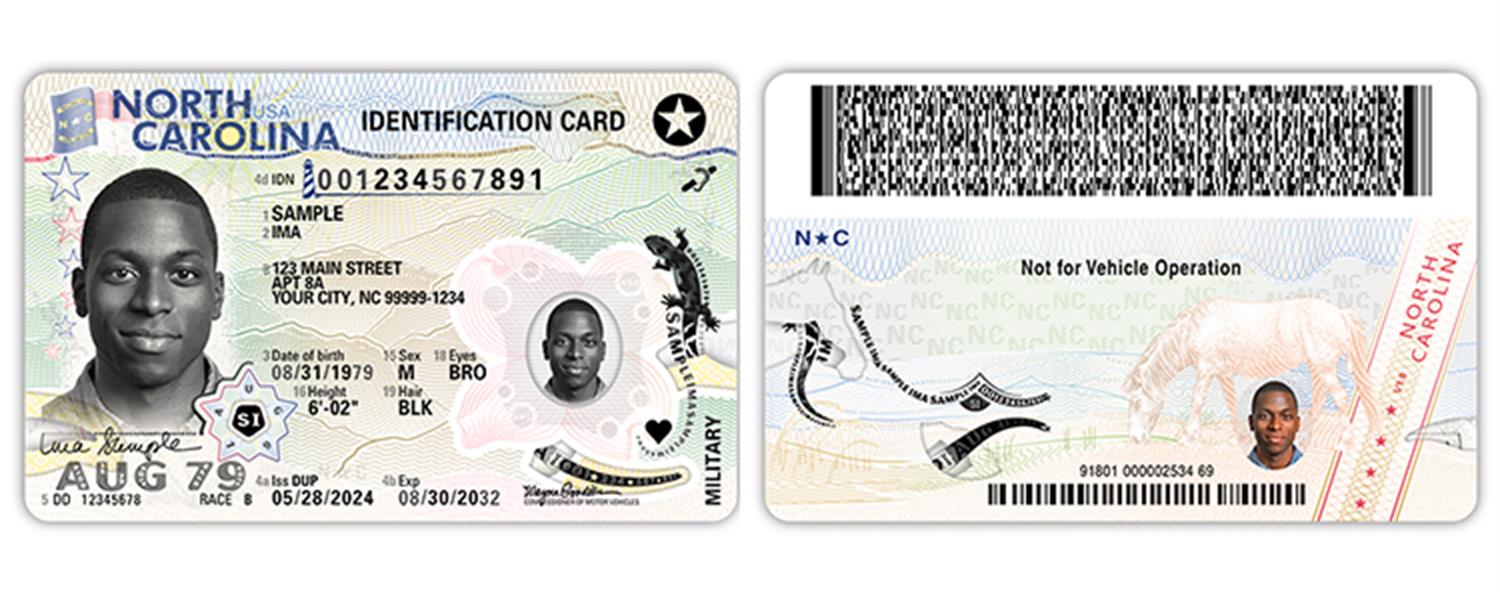
身分証明書の確認では、身分証明書の表面と、通常は書類の反対側にある PDF417 QR コードの両方をスキャンします。米国の運転免許証と、米国の州発行IDカードを確認できます。
### エンクロージャーの推奨事項
Verkada Guest は次と互換性があります [Lilitab](https://www.lilitab.com/products/kiosk-builder) のキオスクです。Lilitab の Kiosk Builder を使用すると、スタンドを簡単にカスタマイズできます。身分証明書の確認では、キオスクに次の [ID 撮影アクセサリ](https://www.lilitab.com/collections/accessories/products/lilitab-id-accessory)を含める必要があります。以下は、サポートされている構成の例です:
{% hint style="danger" %}
Lilitab の Barcode 撮影アクセサリと iPad ID Scan Shelf は **非対応** です。身分証明書の確認には対応していません。
{% endhint %}
### 対応 iPad
身分証明書の確認は、以下の iPad モデルでサポートされています:
| | | | |
| -------- | ----- | ------------- | ------------------ |
| iPad モデル | 世代 | 背面カメラの解像度(MP) | 身分証明書の確認に対応していますか? |
| iPad | 10,11 | 12 | はい |
| iPad | 9 | 8 | はい |
***
## 身分証明書の確認を設定する
### ID スキャン用の背面カメラを選択する
身分証明書の確認を有効にするには、Guest サイト内のタブレットを背面カメラを使用するように設定する必要があります。
{% stepper %}
{% step %}
**Verkada Command で、All Products > Workplace > Guest に移動します。**
{% endstep %}
{% step %}
**左側のナビゲーションで、Guest Settings をクリックします。**
{% endstep %}
{% step %}
**上部で Sites を選択し、ドロップダウンからサイトを選択します。**
{% endstep %}
{% step %}
**[Tablets]で、目的のタブレットを選択します。**
{% endstep %}
{% step %}
**[Photo ID Scan]のドロップダウンメニューを選択し、[Back Camera]を選びます。**
{% endstep %}
{% endstepper %}
### ゲストタイプで身分証明書の確認を有効にする
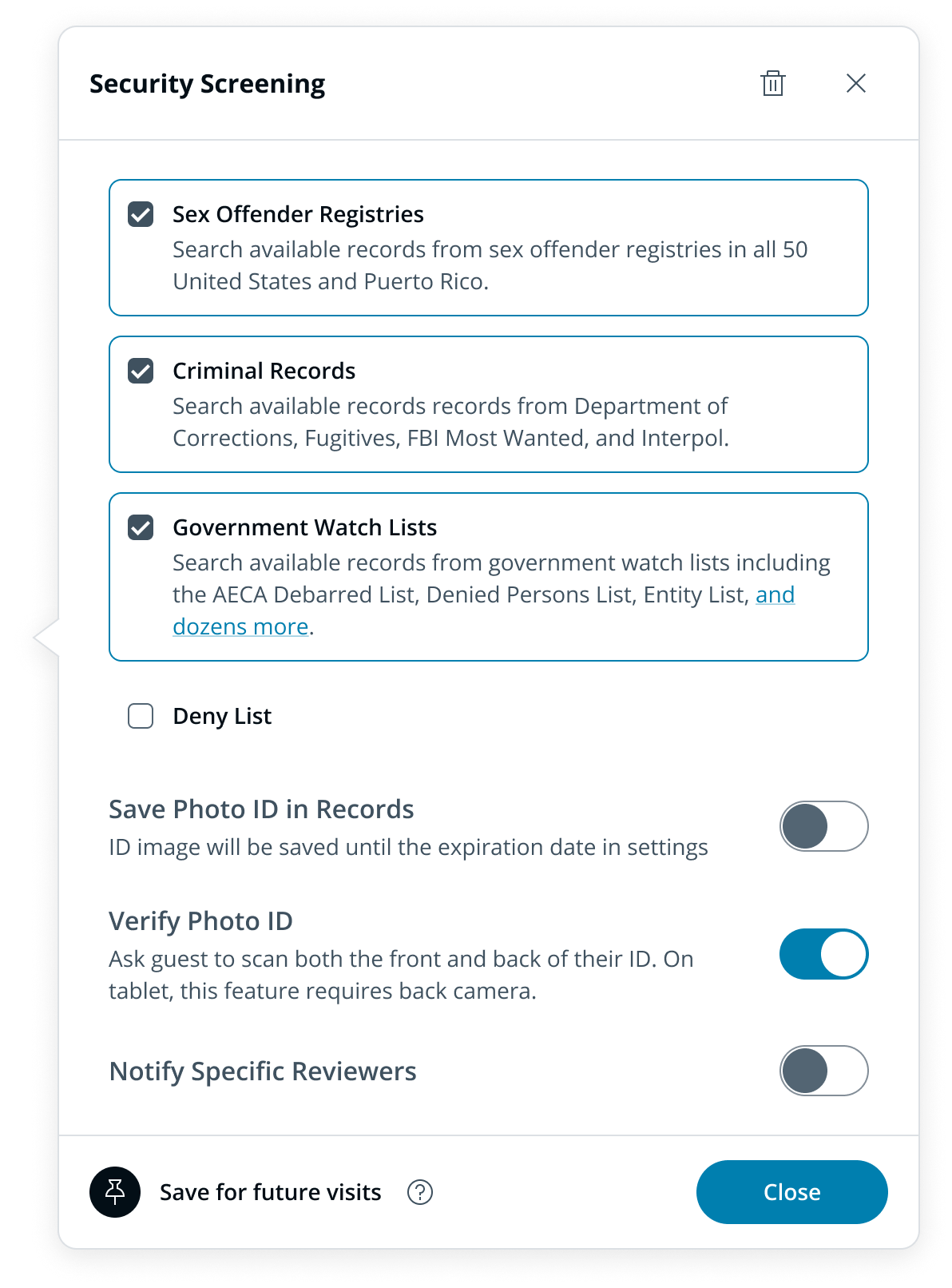
身分証明書の確認は、ゲストタイプのレベルで有効または無効にできます。
{% stepper %}
{% step %}
**Verkada Command で、All Products > Workplace > Guest に移動します。**
{% endstep %}
{% step %}
**左側のナビゲーションで、Guest Settings をクリックします。**
{% endstep %}
{% step %}
**[Sites > Guest Types]で、[Manage Guest Types]をクリックします。**
{% endstep %}
{% step %}
**目的のゲストタイプを選択します。**
{% endstep %}
{% step %}
**次を追加または変更します** [**セキュリティ スクリーニング**](/guest/ja/she-ding/guest-security-screening.md) [**ステップ**](/guest/ja/she-ding/guest-security-screening.md)**.**
{% endstep %}
{% step %}
**[Verify Photo ID]をオンにします。**
{% endstep %}
{% endstepper %}
***
## ID 確認のワークフロー
{% hint style="warning" %}
身分証明書の確認は、Guest アプリ経由のサインインでのみサポートされています。
{% endhint %}
身分証明書の確認を有効にすると、来訪者は ID の表面と裏面をスキャンするよう求められます。どちらかのスキャンに失敗した場合、来訪者は ID スキャンのステップをスキップすることを選択でき、その場合は [手動による ID 確認](/guest/ja/she-ding/guest-security-screening/review-security-screening-results.md).
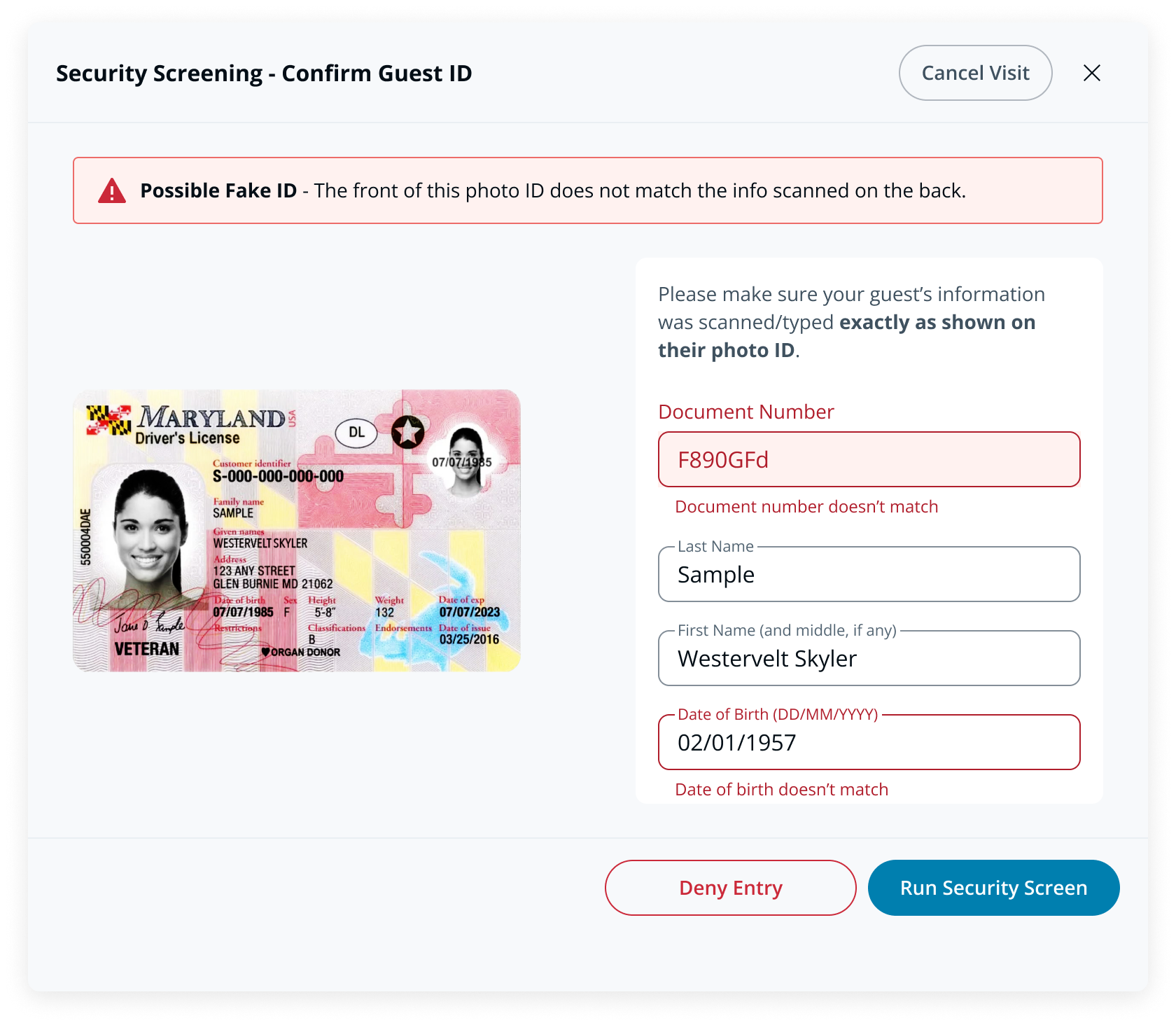
Guest は ID の両面に記載された生年月日と書類番号を比較します。一致しない場合は、スタッフに不一致の確認が求められます。訪問を拒否するか、氏名と生年月日を承認してセキュリティ スクリーニングを続行できます。
### 確認できない書類
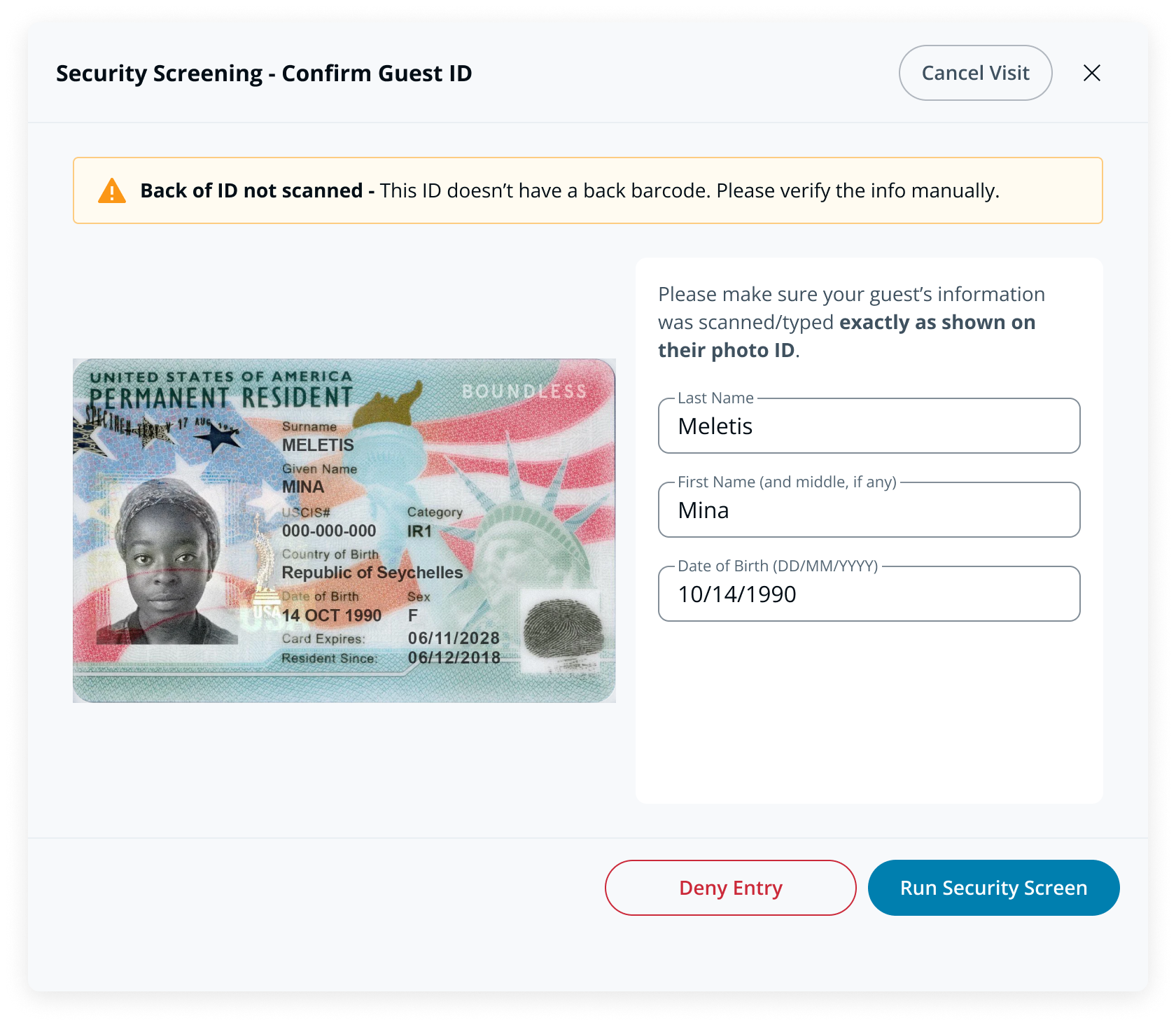
身分証明書の確認が有効になっていても、ID を完全に確認できない場合(例: PDF417 QR コードのない Green Card)、Guest は引き続き ID の表面をスキャンできます。スタッフには、スクリーニングと訪問承認の前に ID 情報の確認が求められます。
***
## FAQ
身分証明書の確認が有効な場合、セキュリティ スクリーニング情報は保存できますか?
はい。ID の両面を正常にスキャンした来訪者については、セキュリティ スクリーニング情報を保存できるため、次回以降の訪問ではこのステップをスキップできます。セキュリティ スクリーニング情報は、最初にサインインしたデバイスに 90 日間保持されます。90 日後、来訪者は再度 ID をスキャンする必要があります。
Web 上で、身分証明書の確認が有効なゲストタイプから来訪者はサインインできますか?
来訪者は web チェックインを通じて身分証明書の確認が有効なゲストタイプにサインインできますが、身分証明書の確認は **実行されません** 。ID の裏面がスキャンされないためです。
身分証明書の確認が有効なゲストタイプはゲストイベントに使用できますか?
はい。身分証明書の確認が有効なゲストタイプはゲストイベントに使用できますが、確認が行われるのは、タブレット上の Guest アプリを使用して現地で登録した来訪者のみです。
1 つのサイトに 2 台のタブレットがあり、1 台は ID スキャンに背面カメラを使用し、もう 1 台は前面カメラを使用している場合、どうなりますか?
来訪者は、ID スキャンに背面カメラを使用しているタブレット上の、身分証明書の確認が有効なゲストタイプからのみサインインできます。
PDF417 QR コードのない身分証明書をスキャンした場合はどうなりますか?
身分証明書の確認が有効な場合でも、Guest は ID 確認に対応していない ID の表面をスキャンできます([詳細を見る](/guest/ja/she-ding/guest-security-screening/identity-document-verification.md))。次の **表面** の ID は Guest でスキャンできます:
* 米国の州発行 ID カード
* 米国の運転免許証
* メキシコの領事カード
* 米国のパスポートブック
* 米国のグリーンカード
* 米国の就労許可証
* Nexus カード
Guest は ID の裏面の写真を保存しますか?
いいえ。Guest は ID の裏面の写真を保存しません。
グローバルゲストタイプは身分証明書の確認をサポートしていますか?
はい、身分証明書の確認はグローバルゲストタイプで有効にできます。来訪者は、ID スキャンに背面カメラを使用するよう構成されたタブレットでのみ、これらのタイプからサインインできます。
---
# Agent Instructions
This documentation is published with GitBook. GitBook is the documentation platform designed so that both humans and AI agents can read, navigate, and reason over technical content effectively. Learn more at gitbook.com.
## Querying This Documentation
If you need additional information that is not directly available in this page, you can query the documentation by asking a question.
Perform an HTTP GET request on the following URL with the `ask` and `goal` query parameters:
```
GET https://help.verkada.com/guest/ja/she-ding/guest-security-screening/identity-document-verification.md?ask=&goal=
```
`ask` is the immediate question: it should be specific, self-contained, and written in natural language.
`goal` is what the user is ultimately trying to achieve, the reason they need the answer. Sharing it helps GitBook give you a better, more relevant answer. A goal is most helpful when it describes the outcome the user wants rather than restating the question. For example, with `ask=how do I create an API token`, a goal like `automate deployments from our CI pipeline` lets GitBook tailor the answer to that use case.
The response will contain a direct answer to the question and relevant excerpts and sources from the documentation.
Use this mechanism when the answer is not explicitly present in the current page, you need clarification or additional context, or you want to retrieve related documentation sections.