# インターホンで招待されたゲストをサインインする
組織はインターコムサインインを使ってサインインをより柔軟にできます。招待された来訪者がVerkadaのインターコムで直接チェックインできるようにする機能です。屋外でのチェックインやゲートに到着するドライバーなどのユースケースに最適です。
ホストは [イベントを作成する](https://help.verkada.com/guest/ja/she-ding/guest-events) Verkada Guestでインターコムサインイン用に設定されたゲストタイプを使用してイベントを作成できます。招待された来訪者が登録され承認されると、モバイルウォレットパスやQRコードをダウンロードできるゲストポータルのリンクが送信されます。
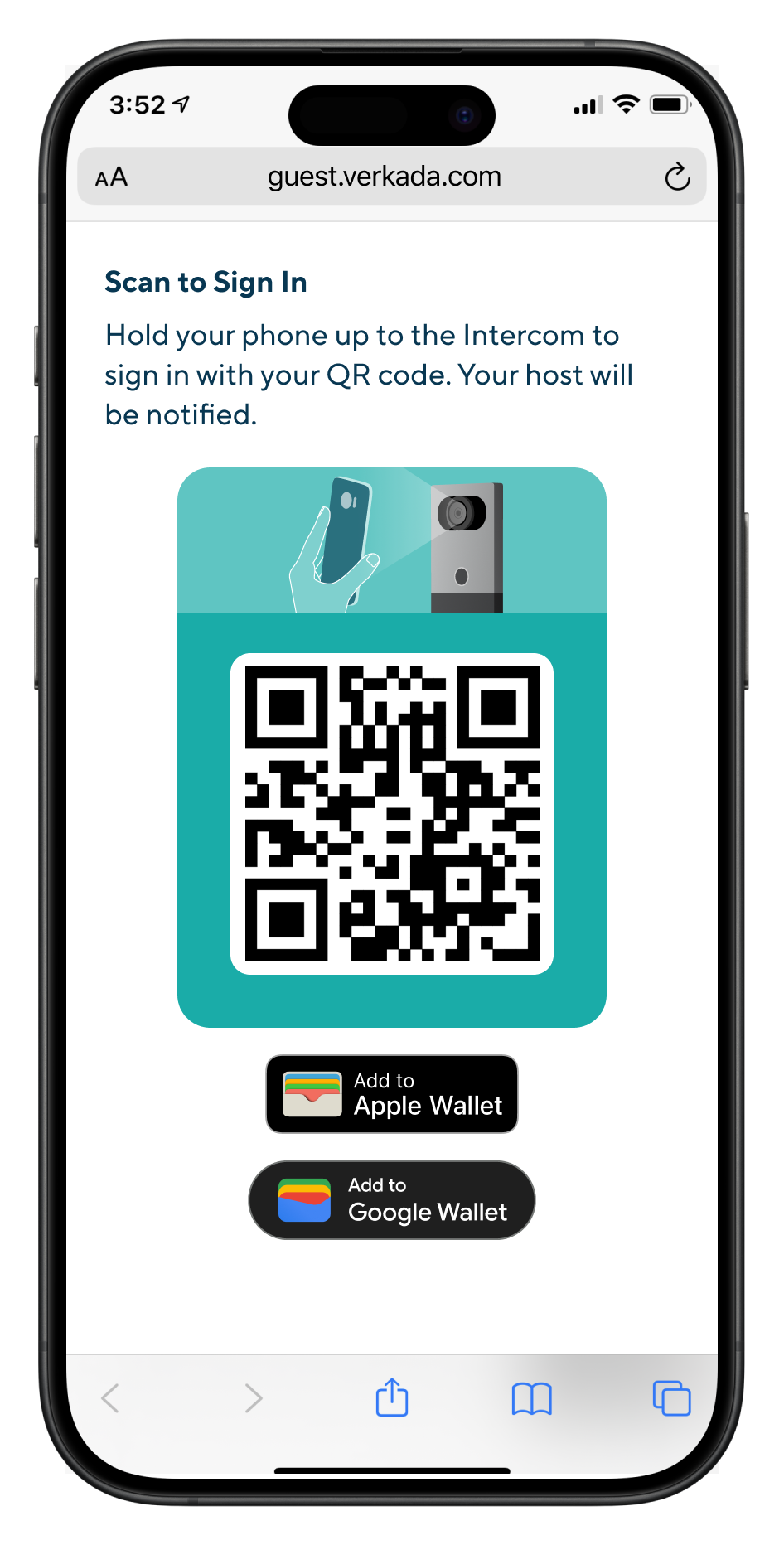
来訪者はイベント当日にインターコムでモバイルウォレットパスやQRコードをスキャンしてチェックインできます。
{% hint style="warning" %}
来訪者はイベント当日のいつでもサインインでき、イベント開始前にゲストポータルのリンクを含むリマインダ通知を受け取ります。
{% endhint %}
***
## 構成
{% hint style="danger" %}
少なくとも **Workplaceサイト管理者** ロールがインターコムサインインの設定に必要です。
{% endhint %}
{% stepper %}
{% step %}
**Verkada Commandで、All Products > Workplace >**  **Guestに移動します。**
{% endstep %}
{% step %}
**左側のナビゲーションで、Guest Settingsをクリックします。**
{% endstep %}
{% step %}
**Sitesの下で、Guest Typesを選択します。**
{% endstep %}
{% step %}
**既存のゲストタイプを選択するか** [**新しいものを作成します**](https://help.verkada.com/guest/ja/she-ding/configure-guest-types)**.**
{% endstep %}
{% step %}
**Guest Passを有効にし、招待に対してインターコムサインインを有効にします。**
{% endstep %}
{% endstepper %}
{% hint style="danger" %}
その [ゲストタイプの可視性コントロール](https://help.verkada.com/guest/ja/she-ding/configure-guest-types/control-guest-type-visibility) には **Invites** が有効にされている必要があります。
{% endhint %}
***
## サインイン時のインターコムによるドア解錠をサポートする
{% hint style="danger" %}
最低でも次のアクセスコントロールロールが必要です: **Access Site Manager *****および*** 最低でも次のWorkplaceロールが必要です: **Workplaceサイト管理者** ゲストタイプにドアアクセスを設定するには。
{% endhint %}
組織は招待された来訪者がVerkadaのインターコムで単一のQRスキャンによりサインインとドア解錠の両方を行えるようにできます。インターコムでのQRコードによる解錠は、次の2つのドアモード構成のみサポートされます:
* **インターコムに直接接続**
* **Verkadaのドアにペアリング**
ゲストタイプは次のように構成されている必要があります: [インターコムサインイン](#h_eb0039178d) に設定されていること [および次の](https://app.gitbook.com/s/aaHs5RfKqv9Z49mi02cC/users-and-credentials/add-a-user-to-the-verkada-access-system/visitor-access-visit-access-type) に関連付けられている必要があります:
{% stepper %}
{% step %}
**次の設定を持つ** [**QR Codes**](https://help.verkada.com/guest/ja/she-ding/door-access-for-guests) **が有効**
{% endstep %}
{% step %}
**インターコムドアが含まれている**
{% endstep %}
{% endstepper %}
{% hint style="warning" %}
招待された来訪者はイベント開始の最大30分前からドアを解錠できます。
{% endhint %}
**Guestに移動します。**
{% endstep %}
{% step %}
**左側のナビゲーションで、Guest Settingsをクリックします。**
{% endstep %}
{% step %}
**Sitesの下で、Guest Typesを選択します。**
{% endstep %}
{% step %}
**既存のゲストタイプを選択するか** [**新しいものを作成します**](https://help.verkada.com/guest/ja/she-ding/configure-guest-types)**.**
{% endstep %}
{% step %}
**Guest Passを有効にし、招待に対してインターコムサインインを有効にします。**
{% endstep %}
{% endstepper %}
{% hint style="danger" %}
その [ゲストタイプの可視性コントロール](https://help.verkada.com/guest/ja/she-ding/configure-guest-types/control-guest-type-visibility) には **Invites** が有効にされている必要があります。
{% endhint %}
***
## サインイン時のインターコムによるドア解錠をサポートする
{% hint style="danger" %}
最低でも次のアクセスコントロールロールが必要です: **Access Site Manager *****および*** 最低でも次のWorkplaceロールが必要です: **Workplaceサイト管理者** ゲストタイプにドアアクセスを設定するには。
{% endhint %}
組織は招待された来訪者がVerkadaのインターコムで単一のQRスキャンによりサインインとドア解錠の両方を行えるようにできます。インターコムでのQRコードによる解錠は、次の2つのドアモード構成のみサポートされます:
* **インターコムに直接接続**
* **Verkadaのドアにペアリング**
ゲストタイプは次のように構成されている必要があります: [インターコムサインイン](#h_eb0039178d) に設定されていること [および次の](https://app.gitbook.com/s/aaHs5RfKqv9Z49mi02cC/users-and-credentials/add-a-user-to-the-verkada-access-system/visitor-access-visit-access-type) に関連付けられている必要があります:
{% stepper %}
{% step %}
**次の設定を持つ** [**QR Codes**](https://help.verkada.com/guest/ja/she-ding/door-access-for-guests) **が有効**
{% endstep %}
{% step %}
**インターコムドアが含まれている**
{% endstep %}
{% endstepper %}
{% hint style="warning" %}
招待された来訪者はイベント開始の最大30分前からドアを解錠できます。
{% endhint %}