> For the complete documentation index, see [llms.txt](https://help.verkada.com/llms.txt). Markdown versions of documentation pages are available by appending `.md` to page URLs; this page is available as [Markdown](https://help.verkada.com/guest/ja/she-ding/guest-events/sign-in-invited-guests-at-an-intercom.md).
# インターホンで招待済みゲストをサインイン
招待された訪問者に、さらに多くのサインイン方法を提供
組織は、Intercom サインインを使用してサインインをより柔軟にできます。これにより、招待された訪問者は Verkada のインターホンで直接チェックインできます。これは、屋外でのチェックイン、ゲートに到着するドライバー、その他同様のユースケースに最適です。
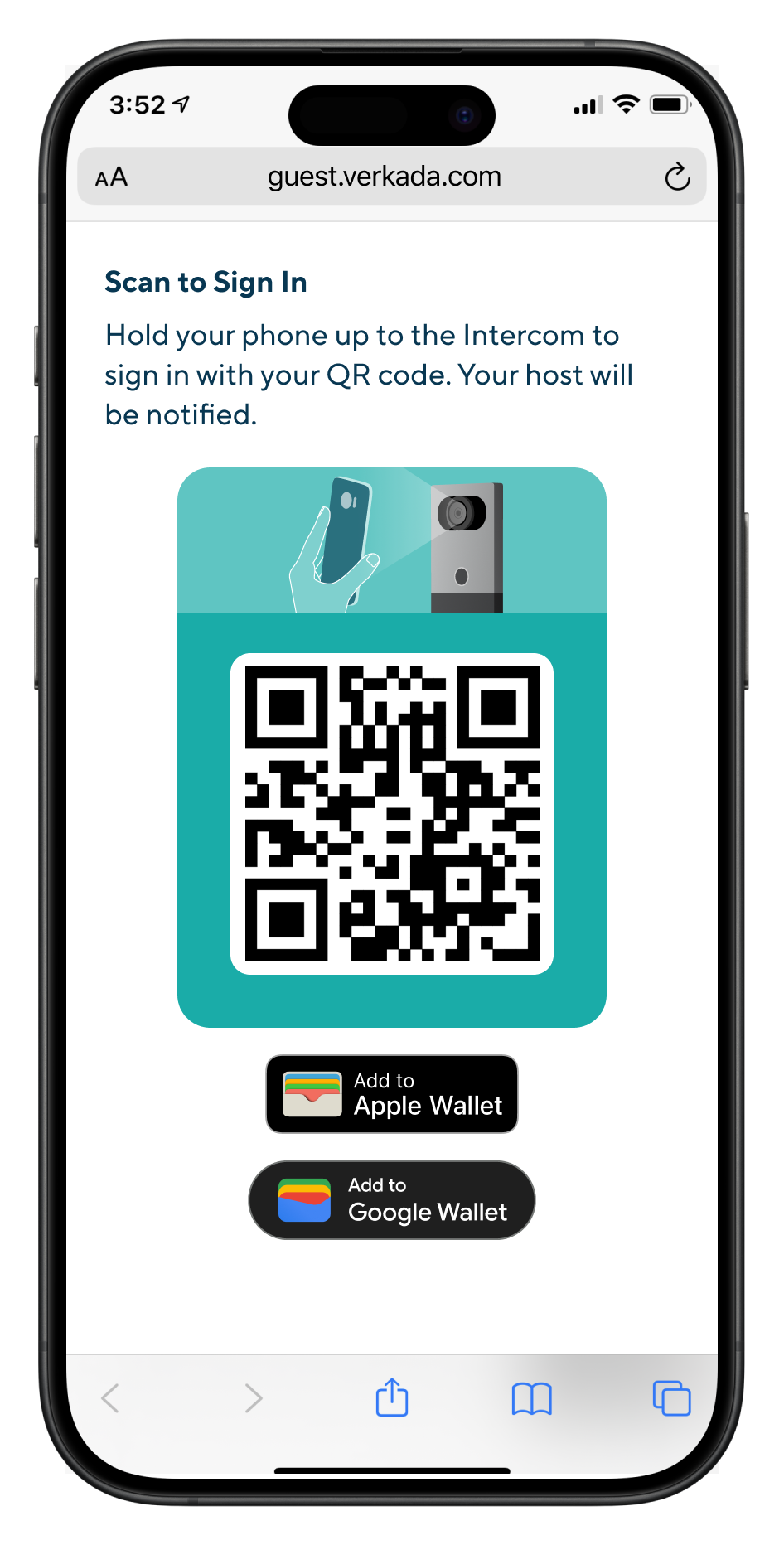
ホストは [イベントを作成できます](/guest/ja/she-ding/guest-events.md) Verkada Guest で、Intercom サインイン用に構成された Guest Type を使用します。招待された訪問者が登録して承認されると、Guest Portal リンクが届き、そこでモバイルウォレットパスまたは QR コードをダウンロードできます。
訪問者は、イベント当日にインターホンでモバイルウォレットパスまたは QR コードをスキャンしてチェックインできます。
{% hint style="warning" %}
訪問者は、イベント当日のいつでもサインインでき、イベント開始前に Guest Portal リンク付きのリマインダー通知を受け取ります。
{% endhint %}
***
## 設定
{% hint style="danger" %}
少なくとも **Workplace サイト管理者** Intercom サインインを構成するためのロール。
{% endhint %}
{% stepper %}
{% step %}
**Verkada Commandでは、All Products > Workplace >**  **Guest。**
{% endstep %}
{% step %}
**左側のナビゲーションで、Guest Settings をクリックします。**
{% endstep %}
{% step %}
**Sites の下で、Guest Types を選択します。**
{% endstep %}
{% step %}
**既存の Guest Type を選択するか** [**新しいものを作成します**](/guest/ja/she-ding/configure-guest-types.md)**.**
{% endstep %}
{% step %}
**Guest Pass を有効にし、招待用の Intercom サインインを有効にします。**
{% endstep %}
{% endstepper %}
{% hint style="danger" %}
その [Guest Type の表示設定](/guest/ja/she-ding/configure-guest-types/control-guest-type-visibility.md) には **招待** が有効になっている必要があります。
{% endhint %}
***
## サインイン時のインターホンのドア解錠をサポート
{% hint style="danger" %}
最低限必要な アクセスコントロール のロールは **Access Site Manager *****および*** 最低限必要な Workplace のロールは **Workplace サイト管理者** ドアアクセス付きのゲストタイプを構成するために必要です。
{% endhint %}
組織は、招待された訪問者が Verkada のインターホンで 1 回の QR スキャンでサインインとドア解錠の両方を行えるようにできます。インターホンでの QR コード解錠は、次の 2 つのドアモード構成でのみサポートされています:
* **インターホンに直接**
* **Verkada ドアとペア設定**
Guest Type は次のために構成されている必要があります: [Intercom サインイン](#h_eb0039178d) また、次の項目にも関連付けられている必要があります: [Visit Access Type](/access-control/ja/yzto/add-a-user-to-the-verkada-access-system/visitor-access-visit-access-type.md) 次の条件を満たすもの:
{% stepper %}
{% step %}
**有効にしている** [**QR コード**](/guest/ja/she-ding/door-access-for-guests.md) **有効**
{% endstep %}
{% step %}
**インターホンのドアを含む**
{% endstep %}
{% endstepper %}
{% hint style="warning" %}
招待された訪問者は、イベント開始の最大 30 分前までドアを解錠できます。
{% endhint %}
---
# Agent Instructions
This documentation is published with GitBook. GitBook is the documentation platform designed so that both humans and AI agents can read, navigate, and reason over technical content effectively. Learn more at gitbook.com.
## Querying This Documentation
If you need additional information that is not directly available in this page, you can query the documentation by asking a question.
Perform an HTTP GET request on the following URL with the `ask` and `goal` query parameters:
```
GET https://help.verkada.com/guest/ja/she-ding/guest-events/sign-in-invited-guests-at-an-intercom.md?ask=&goal=
```
`ask` is the immediate question: it should be specific, self-contained, and written in natural language.
`goal` is what the user is ultimately trying to achieve, the reason they need the answer. Sharing it helps GitBook give you a better, more relevant answer. A goal is most helpful when it describes the outcome the user wants rather than restating the question. For example, with `ask=how do I create an API token`, a goal like `automate deployments from our CI pipeline` lets GitBook tailor the answer to that use case.
The response will contain a direct answer to the question and relevant excerpts and sources from the documentation.
Use this mechanism when the answer is not explicitly present in the current page, you need clarification or additional context, or you want to retrieve related documentation sections.
**Guest。**
{% endstep %}
{% step %}
**左側のナビゲーションで、Guest Settings をクリックします。**
{% endstep %}
{% step %}
**Sites の下で、Guest Types を選択します。**
{% endstep %}
{% step %}
**既存の Guest Type を選択するか** [**新しいものを作成します**](/guest/ja/she-ding/configure-guest-types.md)**.**
{% endstep %}
{% step %}
**Guest Pass を有効にし、招待用の Intercom サインインを有効にします。**
{% endstep %}
{% endstepper %}
{% hint style="danger" %}
その [Guest Type の表示設定](/guest/ja/she-ding/configure-guest-types/control-guest-type-visibility.md) には **招待** が有効になっている必要があります。
{% endhint %}
***
## サインイン時のインターホンのドア解錠をサポート
{% hint style="danger" %}
最低限必要な アクセスコントロール のロールは **Access Site Manager *****および*** 最低限必要な Workplace のロールは **Workplace サイト管理者** ドアアクセス付きのゲストタイプを構成するために必要です。
{% endhint %}
組織は、招待された訪問者が Verkada のインターホンで 1 回の QR スキャンでサインインとドア解錠の両方を行えるようにできます。インターホンでの QR コード解錠は、次の 2 つのドアモード構成でのみサポートされています:
* **インターホンに直接**
* **Verkada ドアとペア設定**
Guest Type は次のために構成されている必要があります: [Intercom サインイン](#h_eb0039178d) また、次の項目にも関連付けられている必要があります: [Visit Access Type](/access-control/ja/yzto/add-a-user-to-the-verkada-access-system/visitor-access-visit-access-type.md) 次の条件を満たすもの:
{% stepper %}
{% step %}
**有効にしている** [**QR コード**](/guest/ja/she-ding/door-access-for-guests.md) **有効**
{% endstep %}
{% step %}
**インターホンのドアを含む**
{% endstep %}
{% endstepper %}
{% hint style="warning" %}
招待された訪問者は、イベント開始の最大 30 分前までドアを解錠できます。
{% endhint %}
---
# Agent Instructions
This documentation is published with GitBook. GitBook is the documentation platform designed so that both humans and AI agents can read, navigate, and reason over technical content effectively. Learn more at gitbook.com.
## Querying This Documentation
If you need additional information that is not directly available in this page, you can query the documentation by asking a question.
Perform an HTTP GET request on the following URL with the `ask` and `goal` query parameters:
```
GET https://help.verkada.com/guest/ja/she-ding/guest-events/sign-in-invited-guests-at-an-intercom.md?ask=&goal=
```
`ask` is the immediate question: it should be specific, self-contained, and written in natural language.
`goal` is what the user is ultimately trying to achieve, the reason they need the answer. Sharing it helps GitBook give you a better, more relevant answer. A goal is most helpful when it describes the outcome the user wants rather than restating the question. For example, with `ask=how do I create an API token`, a goal like `automate deployments from our CI pipeline` lets GitBook tailor the answer to that use case.
The response will contain a direct answer to the question and relevant excerpts and sources from the documentation.
Use this mechanism when the answer is not explicitly present in the current page, you need clarification or additional context, or you want to retrieve related documentation sections.