> For the complete documentation index, see [llms.txt](https://help.verkada.com/llms.txt). Markdown versions of documentation pages are available by appending `.md` to page URLs; this page is available as [Markdown](https://help.verkada.com/guest/ja/she-ding/guest-events/rsvp-links-for-guest.md).
# Guest 向け RSVP リンク
誰でも Guest イベントに登録できるようにする
Guest events により、組織は事前に予定来訪者を把握できます。RSVP リンクは Guest events のオプション機能で、誰でもイベントに登録できるようにします。RSVP リンクにアクセスすると、イベント参加者はイベント登録手続きを完了する必要がある Web ページに移動します。
***
## RSVP リンクを使用してイベントを作成する
{% hint style="danger" %}
my.verkada.com からイベントを作成するには、ユーザーは Verkada Guest サイトのホストである必要があります。
{% endhint %}
{% stepper %}
{% step %}
**ログインする** [**従業員ポータル**](https://my.verkada.com)**.**
{% endstep %}
{% step %}
[**イベントを作成する**](/guest/ja/she-ding/guest-events/manage-events-from-the-employee-portal.md)**.**
{% endstep %}
{% step %}
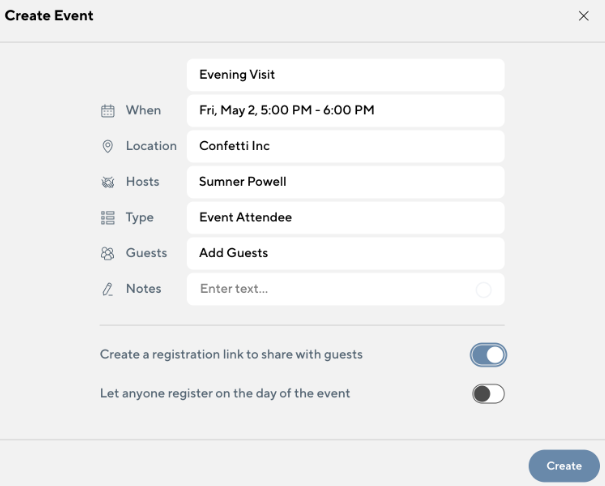
**ゲストと共有する登録リンクを作成するをオンに切り替えます。**
{% endstep %}
{% endstepper %}
***
## RSVP リンクを管理する
RSVP リンクはイベント作成時に生成され、従業員ポータルのイベント詳細から取得できます。
RSVP リンクのトグルを無効にすると以前のリンクは期限切れになりますが、RSVP リンク経由で登録した来訪者には影響しません。
***
## RSVP リンクでイベントに登録する
RSVP リンクは公開アクセス可能なリンクで、誰でもアクセスできます。参加予定者は、RSVP リンクを通じてイベントに登録する際に、必要なゲスト種別の手順を完了します。RSVP リンクから来訪者を登録する手順は以下のとおりです:
{% stepper %}
{% step %}
**来訪者は RSVP リンクを開き、フォームに入力します。**
{% endstep %}
{% step %}
**セキュリティ審査結果やその他の拒否理由は、Command の** [**ゲストイベント**](/guest/ja/she-ding/guest-events.md) **ページ。**
{% endstep %}
{% step %}
**参加者は、メールで送信されたリンクから出席をマークすることも、Guest タブレットで出席をマークすることもできます。別途、Command ユーザーはイベント当日に参加者を出席登録できます。**
{% endstep %}
{% endstepper %}
***
## FAQ
ゲストと共有する登録リンクを作成するをオフにするとどうなりますか?
イベント主催者が RSVP リンクのトグルをオフにすると、そのリンクは参加予定者がイベントに登録するために使用できなくなります。すでにイベントに登録済みの全員には影響ありません。
学校のゲスト種別を使用するイベントを作成できますか?
いいえ、学校のゲスト種別では招待はサポートされていません。
---
# Agent Instructions
This documentation is published with GitBook. GitBook is the documentation platform designed so that both humans and AI agents can read, navigate, and reason over technical content effectively. Learn more at gitbook.com.
## Querying This Documentation
If you need additional information that is not directly available in this page, you can query the documentation by asking a question.
Perform an HTTP GET request on the following URL with the `ask` and `goal` query parameters:
```
GET https://help.verkada.com/guest/ja/she-ding/guest-events/rsvp-links-for-guest.md?ask=&goal=
```
`ask` is the immediate question: it should be specific, self-contained, and written in natural language.
`goal` is what the user is ultimately trying to achieve, the reason they need the answer. Sharing it helps GitBook give you a better, more relevant answer. A goal is most helpful when it describes the outcome the user wants rather than restating the question. For example, with `ask=how do I create an API token`, a goal like `automate deployments from our CI pipeline` lets GitBook tailor the answer to that use case.
The response will contain a direct answer to the question and relevant excerpts and sources from the documentation.
Use this mechanism when the answer is not explicitly present in the current page, you need clarification or additional context, or you want to retrieve related documentation sections.