> For the complete documentation index, see [llms.txt](https://help.verkada.com/llms.txt). Markdown versions of documentation pages are available by appending `.md` to page URLs; this page is available as [Markdown](https://help.verkada.com/guest/ja/she-ding/guest-employee-portal.md).
# Guest 従業員ポータル
Employee Portal では、ホストが連絡先の設定、プライバシー設定、Guest iPad 上でのディレクトリ表示、将来の来訪に向けたゲスト招待を管理できます。ポータルにアクセスするには、次の URL にアクセスしてください [my.verkada.com](https://my.verkada.com/#login).
***
## プロフィール設定にアクセス
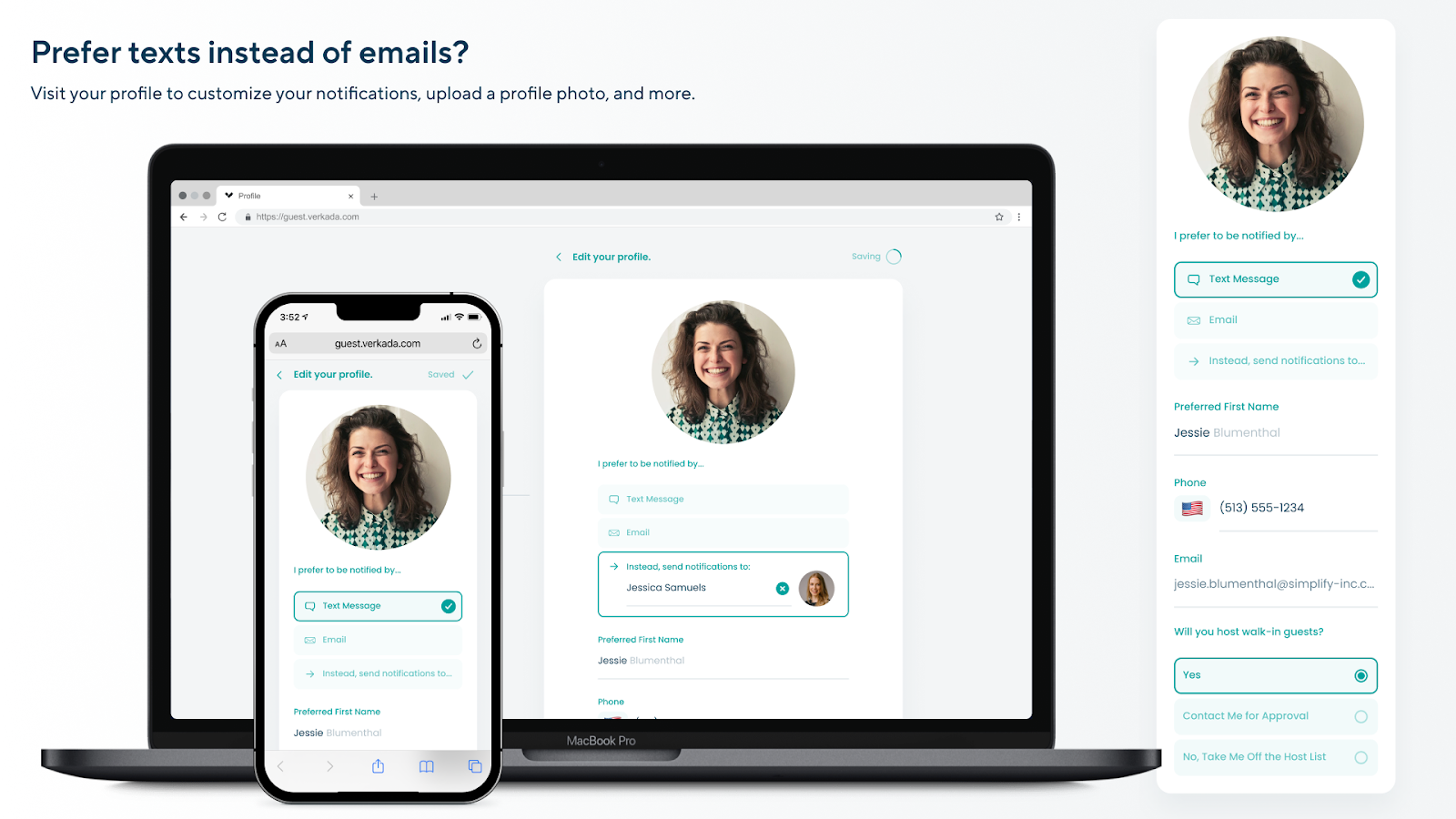
Guest ホームページの[プロフィール]タブからプロフィール情報を編集できます
{% stepper %}
{% step %}
**次の場所でアカウントにログインしてください** [**my.verkada.com**](https://my.verkada.com/#login)**.**
{% endstep %}
{% step %}
**右上で、** :circle-user: :bars: **> プロフィールを編集。**
{% endstep %}
{% step %}
**あなたの** [**プロフィール設定オプション**](#h_327363bcc0) **必要に応じて。**
{% endstep %}
{% endstepper %}
## プロフィール設定オプション
{% stepper %}
{% step %}
**プロフィール写真 - ゲストへのメールおよび SMS 通知に表示する写真をアップロードします。写真を表示しないこともできます。**
{% endstep %}
{% step %}
**通知設定 - 到着通知をメール、SMS、またはその両方で受信するかどうかを選択します。通知を他のユーザーに委任することもできます。(たとえば、休暇中の同僚など)**
{% endstep %}
{% step %}
**希望する名 - Guest iPad に表示する呼び名を設定します(例:「Robert」の代わりに「Bobby」と表示)。**
{% endstep %}
{% step %}
**従業員ステータス - 従業員ディレクトリに表示されたままにする、各ゲストごとに手動承認を必要とする、または一覧から完全に削除する、のいずれかを選択できます。**
{% endstep %}
{% step %}
[**ゲストを招待**](/guest/ja/she-ding/guest-events/manage-events-from-the-employee-portal.md) **- Google カレンダーまたは Microsoft Outlook 経由で招待を送信するには、イベントの[ゲストを招待]をクリックします。**
{% endstep %}
{% endstepper %}
{% hint style="warning" %}
ホストは来訪者通知を他の従業員に委任できます。委任先の受信者は、通知をさらに別のユーザーに割り当てることはできません。
{% endhint %}
---
# Agent Instructions
This documentation is published with GitBook. GitBook is the documentation platform designed so that both humans and AI agents can read, navigate, and reason over technical content effectively. Learn more at gitbook.com.
## Querying This Documentation
If you need additional information that is not directly available in this page, you can query the documentation by asking a question.
Perform an HTTP GET request on the following URL with the `ask` and `goal` query parameters:
```
GET https://help.verkada.com/guest/ja/she-ding/guest-employee-portal.md?ask=&goal=
```
`ask` is the immediate question: it should be specific, self-contained, and written in natural language.
`goal` is what the user is ultimately trying to achieve, the reason they need the answer. Sharing it helps GitBook give you a better, more relevant answer. A goal is most helpful when it describes the outcome the user wants rather than restating the question. For example, with `ask=how do I create an API token`, a goal like `automate deployments from our CI pipeline` lets GitBook tailor the answer to that use case.
The response will contain a direct answer to the question and relevant excerpts and sources from the documentation.
Use this mechanism when the answer is not explicitly present in the current page, you need clarification or additional context, or you want to retrieve related documentation sections.