> For the complete documentation index, see [llms.txt](https://help.verkada.com/llms.txt). Markdown versions of documentation pages are available by appending `.md` to page URLs; this page is available as [Markdown](https://help.verkada.com/guest/ja/she-ding/customize-guest-deny-lists.md).
# Guest 拒否リストをカスタマイズ
Verkada Guest で拒否リストをカスタマイズする方法を学ぶ
拒否リストは、組織が不要な来訪者を制限するための [セキュリティ審査](/guest/ja/she-ding/guest-security-screening.md)。その中で [Verkada Guest](https://docs.verkada.com/docs/verkada-guest-overview.pdf)、管理者はサイトごとおよび組織全体で、個人のカスタム拒否リストを管理できます。\
\
これは、次のような保護が必要なケースに最適です:
* 接近禁止命令
* 複雑な親権・監護の取り決め
* 不満を抱えた元従業員
* 不法侵入者
***
## 設定
カスタム拒否リストは、サイトレベルおよび組織レベルで管理できます。
{% hint style="danger" %}
* 必要です **オーガナイゼーション' 管理者** オーガナイゼーション' レベルの拒否リストを編集する権限。
* 必要です **Workplace サイト管理者** サイトレベルの拒否リストを編集する権限。
{% endhint %}
{% stepper %}
{% step %}
**Verkada Command で、All Products > Workplace > Guest に移動します。**
{% endstep %}
{% step %}
**左側のナビゲーションで、Guest Settings をクリックします。**
{% endstep %}
{% step %}
**オーガナイゼーション' > 拒否リスト または サイト > 拒否リスト で、[拒否リストを管理]を選択します。**
{% endstep %}
{% endstepper %}
### 手動入力
既存の拒否リストに個人を追加するために、手動入力を作成できます。
{% stepper %}
{% step %}
**右上で[追加]を選択します。**
{% endstep %}
{% step %}
**アップロード方法を選択してください:**
a. **個人を追加:**
1. 名と姓を入力します。
2. (任意)生年月日を入力します。
3. (任意)メモを入力します。
4. (任意)写真を追加します。
5. クリック **保存します。**
g. **CSVで追加:**
1. 正しくフォーマットされたCSVファイルを選択します。
2. クリック **保存します。**
{% endstep %}
{% endstepper %}
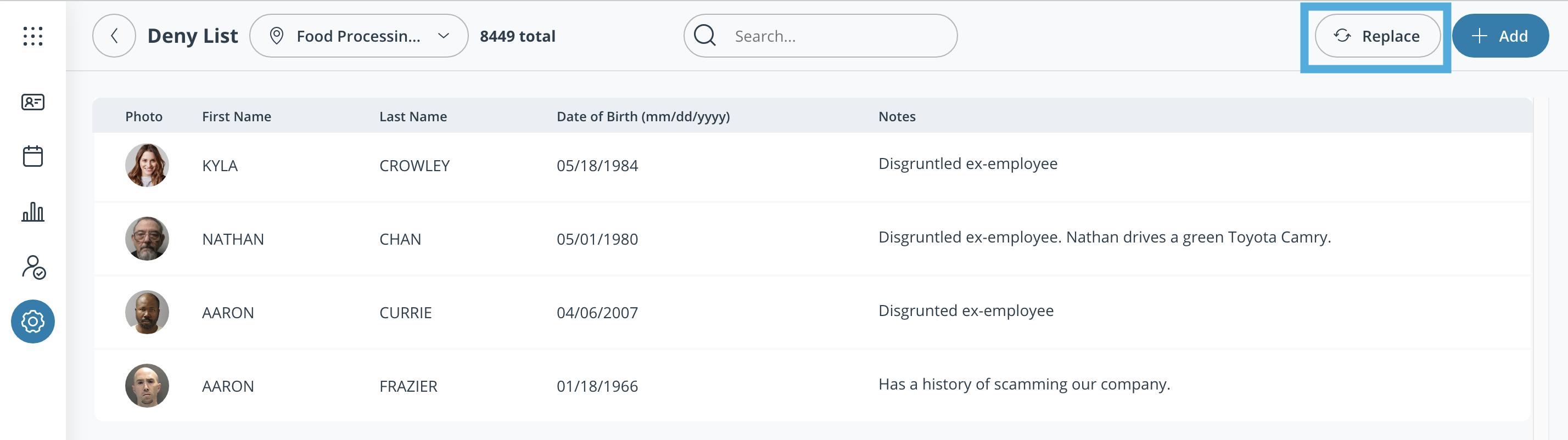
### 一括アップロード
CSVアップロードで拒否リスト全体を置き換えることができます。
{% stepper %}
{% step %}
**右上で[置き換え]を選択します。**
{% endstep %}
{% step %}
**正しくフォーマットされたCSVファイルをアップロードします。**
{% endstep %}
{% step %}
**[保存]を選択します。**
{% endstep %}
{% endstepper %}
***
## 拒否リストCSVの書式
| 必須 | 説明 |
| ------------ | -------------------------------------------------------------------------- |
| `first_name` | 拒否したいゲストの名です。可能であれば、ミドルネームを **first\_name** フィールドに「John Michael」の形式で入力します。 |
| `last_name` | 拒否したいゲストの姓です。 |
| 任意 | 説明 |
| ---------------- | ------------------------------------------------------------------------ |
| `生年月日(YYYYMMDD)` | ゲストの生年月日です。このフィールドにより、より具体的な一致が可能になります。 |
| `notes` | 容疑者が拒否リストのエントリと一致した場合、追加メモを受付係と共有できます。 |
| `photo_url` | 顔写真へのリンクを追加します。形式は次のいずれかです **.jpeg、.png、または.jpg**。URLはHTTPSを使用する必要があります。 |
---
# Agent Instructions
This documentation is published with GitBook. GitBook is the documentation platform designed so that both humans and AI agents can read, navigate, and reason over technical content effectively. Learn more at gitbook.com.
## Querying This Documentation
If you need additional information that is not directly available in this page, you can query the documentation by asking a question.
Perform an HTTP GET request on the following URL with the `ask` and `goal` query parameters:
```
GET https://help.verkada.com/guest/ja/she-ding/customize-guest-deny-lists.md?ask=&goal=
```
`ask` is the immediate question: it should be specific, self-contained, and written in natural language.
`goal` is what the user is ultimately trying to achieve, the reason they need the answer. Sharing it helps GitBook give you a better, more relevant answer. A goal is most helpful when it describes the outcome the user wants rather than restating the question. For example, with `ask=how do I create an API token`, a goal like `automate deployments from our CI pipeline` lets GitBook tailor the answer to that use case.
The response will contain a direct answer to the question and relevant excerpts and sources from the documentation.
Use this mechanism when the answer is not explicitly present in the current page, you need clarification or additional context, or you want to retrieve related documentation sections.