> For the complete documentation index, see [llms.txt](https://help.verkada.com/llms.txt). Markdown versions of documentation pages are available by appending `.md` to page URLs; this page is available as [Markdown](https://help.verkada.com/guest/de/konfiguration/guest-employee-portal.md).
# Guest-Mitarbeiterportal
Das Mitarbeiterportal ermöglicht es Gastgebern, ihre Kontaktpräferenzen, Datenschutzeinstellungen, das Verzeichnis-Erscheinungsbild auf dem Gast-iPad und Gästeinladungen für zukünftige Besuche zu verwalten. Um auf das Portal zuzugreifen, besuchen Sie [my.verkada.com](https://my.verkada.com/#login).
***
## Auf Profileinstellungen zugreifen
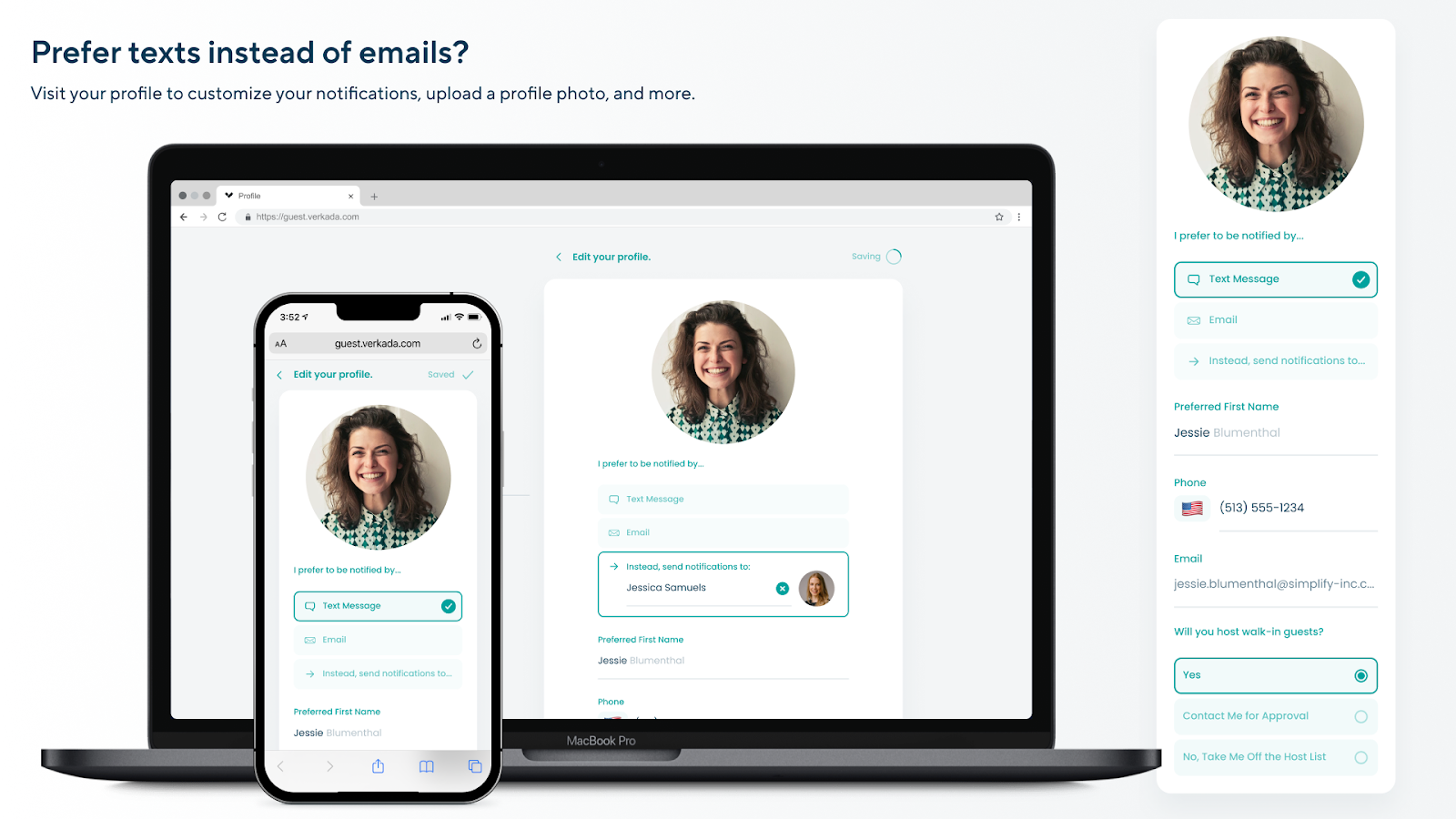
Sie können Ihre Profilinformationen über den Tab „Profil“ auf der Gast-Startseite bearbeiten
{% stepper %}
{% step %}
**Melden Sie sich bei Ihrem Konto an auf** [**my.verkada.com**](https://my.verkada.com/#login)**.**
{% endstep %}
{% step %}
**Klicken Sie oben rechts auf** :circle-user: :bars: **> Profil bearbeiten.**
{% endstep %}
{% step %}
**Bearbeiten Sie Ihre** [**Optionen für die Profileinstellungen**](#h_327363bcc0) **bei Bedarf.**
{% endstep %}
{% endstepper %}
## Optionen für die Profileinstellungen
{% stepper %}
{% step %}
**Profilfoto - Laden Sie ein Foto hoch, das in Gast-E-Mail- und SMS-Benachrichtigungen angezeigt wird. Sie können auch wählen, kein Foto anzuzeigen.**
{% endstep %}
{% step %}
**Benachrichtigungseinstellungen - Wählen Sie aus, ob Sie Ankunftsbenachrichtigungen per E-Mail, SMS oder beides erhalten möchten. Sie können Benachrichtigungen auch an einen anderen Benutzer delegieren. (z. B. an Ihren Kollegen, wenn Sie im Urlaub sind usw.).**
{% endstep %}
{% step %}
**Bevorzugter Vorname - Legen Sie einen bevorzugten Namen fest, der auf dem Gast-iPad angezeigt wird (z. B. „Bobby“ statt „Robert“).**
{% endstep %}
{% step %}
**Mitarbeiterstatus - Wählen Sie, ob Sie im Mitarbeiterverzeichnis sichtbar bleiben, für jeden Gast eine manuelle Genehmigung erforderlich sein soll oder Sie sich vollständig aus der Liste entfernen.**
{% endstep %}
{% step %}
[**Gäste einladen**](/guest/de/konfiguration/guest-events/manage-events-from-the-employee-portal.md) **- Klicken Sie auf „Gäste zu Veranstaltungen einladen“, um Einladungen über Google Kalender oder Microsoft Outlook zu senden.**
{% endstep %}
{% endstepper %}
{% hint style="warning" %}
Gastgeber können Besucherbenachrichtigungen an andere Mitarbeiter delegieren. Delegierte Empfänger können Benachrichtigungen nicht an weitere Benutzer zuweisen.
{% endhint %}
---
# Agent Instructions
This documentation is published with GitBook. GitBook is the documentation platform designed so that both humans and AI agents can read, navigate, and reason over technical content effectively. Learn more at gitbook.com.
## Querying This Documentation
If you need additional information that is not directly available in this page, you can query the documentation by asking a question.
Perform an HTTP GET request on the following URL with the `ask` and `goal` query parameters:
```
GET https://help.verkada.com/guest/de/konfiguration/guest-employee-portal.md?ask=&goal=
```
`ask` is the immediate question: it should be specific, self-contained, and written in natural language.
`goal` is what the user is ultimately trying to achieve, the reason they need the answer. Sharing it helps GitBook give you a better, more relevant answer. A goal is most helpful when it describes the outcome the user wants rather than restating the question. For example, with `ask=how do I create an API token`, a goal like `automate deployments from our CI pipeline` lets GitBook tailor the answer to that use case.
The response will contain a direct answer to the question and relevant excerpts and sources from the documentation.
Use this mechanism when the answer is not explicitly present in the current page, you need clarification or additional context, or you want to retrieve related documentation sections.