> For the complete documentation index, see [llms.txt](https://help.verkada.com/llms.txt). Markdown versions of documentation pages are available by appending `.md` to page URLs; this page is available as [Markdown](https://help.verkada.com/connectivity/ja/she-ding/add-cellular-gateway-to-command/enable-historical-gps-data-on-gc31-e-gateways.md).
# GC31-E Gatewaysで履歴GPSデータを有効にする
Verkada Outdoor Cellular Gatewayで履歴GPSデータの保存を有効にする
Verkada Outdoor Cellular Gateway は、定期的に位置情報を報告できます。この機能を有効にすると、Gateway は位置データをクラウドに保存し、ユーザーは Verkada Command で Mobile Gateway の展開履歴ルートを直接確認できます。この機能は、捜査だけでなく、一般的な車両追跡にも役立ちます。
{% hint style="danger" %}
GPS 座標を報告できるのは Cellular Gateway デバイスのみです。この機能は Wi-Fi Gateway では利用できません。
{% endhint %}
***
## Gateway の GPS 履歴を有効にする
### オーガナイゼーション' レベル
Cellular Gateway で GPS 履歴機能を有効にするには、まずオーガナイゼーション' でこの機能を有効にする必要があります。
{% stepper %}
{% step %}
**Verkada Command で、「All Products」>「Admin」に移動します。**
{% endstep %}
{% step %}
**Feature Manager を選択します。**
{% endstep %}
{% step %}
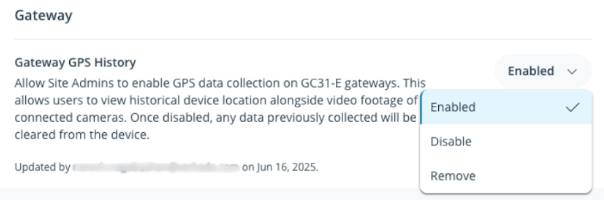
**Gateway > Gateway GPS History の下で、ドロップダウン メニューから「Enabled」を選択します。**
{% endstep %}
{% endstepper %}
### Verkada Cellular Gateway
{% stepper %}
{% step %}
**Verkada Command で、「All Products」>「Gateways」に移動します。**
{% endstep %}
{% step %}
**設定するゲートウェイを選択します。**
{% endstep %}
{% step %}
**右上の「設定」をクリックします。**
{% endstep %}
{% step %}
**GPS > GPS History の下で、ドロップダウン メニューから「On」を選択します。有効にすると、ゲートウェイの詳細ページからこの機能にアクセスできます。**
{% endstep %}
{% endstepper %}
ゲートウェイは過去の GPS 座標の報告を開始し、捜査や一般的な車両追跡に役立ちます。
***
## GPS 履歴から信号カバレッジ データを表示する
{% stepper %}
{% step %}
**Verkada Command で、「All Products」>「Gateways」に移動します。**
{% endstep %}
{% step %}
**表示するゲートウェイを選択します。**
{% endstep %}
{% step %}
**GPS 履歴をクリックします。**
a. オンに切り替える **信号強度** ゲートウェイのルートに沿った過去のキャリア信号データを表示するには。\
b. オンに切り替えると、ゲートウェイのルートに沿ったキャリア情報を表示できます。
{% endstep %}
{% endstepper %}
***
## よくある質問
ゲートウェイはどのくらいの頻度で GPS データを収集しますか?
GC31-E は 10 秒ごとに GPS データをサンプリングします。
GPS データはどのくらいの頻度でクラウドにアップロードされますか?
GPS データは 2 分ごとにクラウドにアップロードされます。
GPS データをクラウドにアップロードするには、携帯回線接続が必要ですか?
GPS のサンプリングは携帯回線接続なしでも行われますが、データをクラウドにアップロードするには、GC31-E の携帯回線接続が必要です。
報告される GPS 位置情報の精度はどの程度ですか?
Cellular Gateway の GPS は、約 ±50 メートルの精度を提供します。
---
# Agent Instructions
This documentation is published with GitBook. GitBook is the documentation platform designed so that both humans and AI agents can read, navigate, and reason over technical content effectively. Learn more at gitbook.com.
## Querying This Documentation
If you need additional information that is not directly available in this page, you can query the documentation by asking a question.
Perform an HTTP GET request on the following URL with the `ask` and `goal` query parameters:
```
GET https://help.verkada.com/connectivity/ja/she-ding/add-cellular-gateway-to-command/enable-historical-gps-data-on-gc31-e-gateways.md?ask=&goal=
```
`ask` is the immediate question: it should be specific, self-contained, and written in natural language.
`goal` is what the user is ultimately trying to achieve, the reason they need the answer. Sharing it helps GitBook give you a better, more relevant answer. A goal is most helpful when it describes the outcome the user wants rather than restating the question. For example, with `ask=how do I create an API token`, a goal like `automate deployments from our CI pipeline` lets GitBook tailor the answer to that use case.
The response will contain a direct answer to the question and relevant excerpts and sources from the documentation.
Use this mechanism when the answer is not explicitly present in the current page, you need clarification or additional context, or you want to retrieve related documentation sections.