> For the complete documentation index, see [llms.txt](https://help.verkada.com/llms.txt). Markdown versions of documentation pages are available by appending `.md` to page URLs; this page is available as [Markdown](https://help.verkada.com/connectivity/ja/she-ding/add-cellular-gateway-to-command/cellular-gateway-dual-sim-support.md).
# Cellular GatewayのデュアルSIMサポート
Verkada GC31 Cellular GatewayがデュアルSIM機能をサポートする仕組みを学ぶ
各 Verkada セルラーゲートウェイには、自動フェイルオーバー機能付きのSIMスロットが2つあります。
## デュアルSIM機能の仕組み
GC31 には標準で 2 つのSIMスロットが搭載されています:
* スロット1(標準でプライマリ)
* スロット2(標準でセカンダリ)
すべての GC31 には、Verkada データSIM が次のスロットに挿入されています **スロット2**。このSIMカードは、オプションの [Verkada データプラン](/connectivity/ja/mobairudtanoopushon/verkada-data-plan.md).
独自のデータプランを利用するお客様は、SIMカードを次のスロットに挿入できます **スロット1、** これがプライマリSIMとして機能し、Verkada SIM は次のスロットに残します **スロット2**。お客様提供のSIMに障害が発生した場合、GC31 は Verkada SIM にフォールバックし、ゲートウェイへの到達性を常に確保するのに役立ちます。
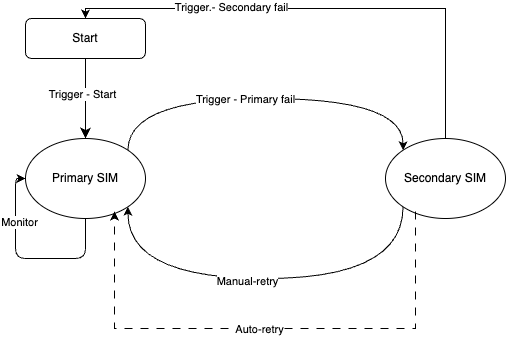
お客様は両方のスロットに独自のSIMカードを挿入し、どちらをプライマリにするかを選択することもできます。構成にかかわらず、GC31 は以下の状態マシンに従って動作します。
## SIMフェイルオーバー
GC31 には、LTE モデム上のSIMアクティビティを常時モニターする状態マシンがあり、動作は次のとおりです:
{% stepper %}
{% step %}
**開始—デバイスの起動時に状態マシンがトリガーされます。**
{% endstep %}
{% step %}
**プライマリ(モニター)—LTE モデム上の一般入出力(GPIO)ピンが、SIM がプライマリスロットに挿入されたことを検出します。**
* GC31 はプライマリSIM経由で接続を試み、数秒ごとにバックエンドサーバーへ ping を送信します。
* それらの ping が複数回連続で失敗すると、状態マシンはセカンダリへのフェイルオーバーをトリガーします。
{% endstep %}
{% step %}
**プライマリ(失敗)—プライマリSIM がサーバーへの ping に複数回失敗するとトリガーされます。デバイスはセカンダリSIM にフェイルオーバーします。**
{% endstep %}
{% step %}
**自動再試行 — デバイスは接続喪失から15分後に自動的にプライマリSIMへ切り替わります。それが失敗した場合は30分後に再試行し、その後1時間後に再度再試行します。以後24時間は1時間ごとに再試行し、その後は再接続されるまで24時間ごとに再試行を続けます。**
{% endstep %}
{% step %}
**手動再試行 — セカンダリSIM が有効になると、プライマリ経由で接続したい場合、ユーザーは手動でプライマリSIM に戻す必要があります。**
{% endstep %}
{% step %}
**セカンダリ(失敗)—セカンダリSIM がサーバーへの ping に複数回失敗するとトリガーされます。状態マシンは開始フェーズに戻ります。**
{% endstep %}
{% endstepper %}
---
# Agent Instructions
This documentation is published with GitBook. GitBook is the documentation platform designed so that both humans and AI agents can read, navigate, and reason over technical content effectively. Learn more at gitbook.com.
## Querying This Documentation
If you need additional information that is not directly available in this page, you can query the documentation by asking a question.
Perform an HTTP GET request on the following URL with the `ask` and `goal` query parameters:
```
GET https://help.verkada.com/connectivity/ja/she-ding/add-cellular-gateway-to-command/cellular-gateway-dual-sim-support.md?ask=&goal=
```
`ask` is the immediate question: it should be specific, self-contained, and written in natural language.
`goal` is what the user is ultimately trying to achieve, the reason they need the answer. Sharing it helps GitBook give you a better, more relevant answer. A goal is most helpful when it describes the outcome the user wants rather than restating the question. For example, with `ask=how do I create an API token`, a goal like `automate deployments from our CI pipeline` lets GitBook tailor the answer to that use case.
The response will contain a direct answer to the question and relevant excerpts and sources from the documentation.
Use this mechanism when the answer is not explicitly present in the current page, you need clarification or additional context, or you want to retrieve related documentation sections.