> For the complete documentation index, see [llms.txt](https://help.verkada.com/llms.txt). Markdown versions of documentation pages are available by appending `.md` to page URLs; this page is available as [Markdown](https://help.verkada.com/connectivity/ja/she-ding/add-cellular-gateway-to-command/access-the-cellular-gateway-local-server-page.md).
# Cellular Gatewayのローカルサーバーページにアクセスする
GC31 Cellular Gatewayのローカルサーバーページへのアクセス方法を学ぶ
ローカルサーバーは、接続するための手段として機能します [Verkada の GC31 Cellular Gateway](https://www.verkada.com/cellular-gateway)。ローカルサーバーページを使用して、カスタムのアクセスポイント名(APN)設定を適用できます。
設定するには [SIM カード](/connectivity/ja/she-ding/add-cellular-gateway-to-command/cellular-gateway-dual-sim-support.md) 接続を確立する前に、ローカルサーバーを使用してください。
{% stepper %}
{% step %}
**ゲートウェイを Ethernet ケーブルでノートパソコン/コンピュータに接続します。**
{% endstep %}
{% step %}
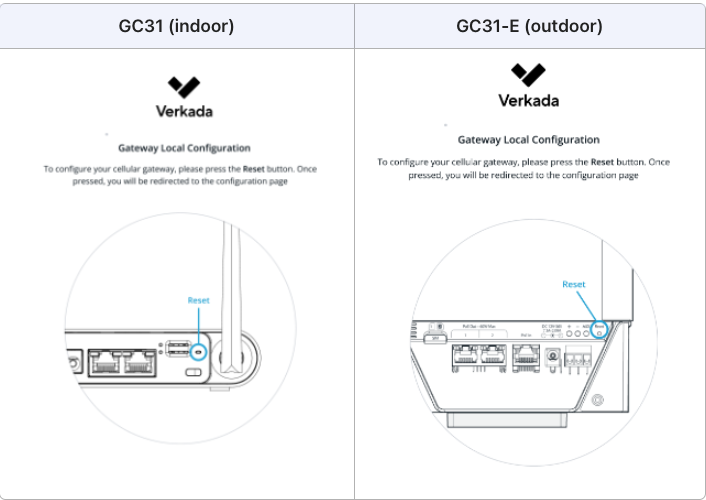
**ブラウザーを開いて入力します** [**verkadagateway.com**](http://verkadagateway.com/) **または** [**192.168.1.1**](http://verkadagateway.com/) **以下に示すように、ローカルランディングページ(GC31 または GC31-E)を開くには、**
{% endstep %}
{% step %}
**画面の指示に従って、ローカルサーバーページに移動します。既定では、APN は自動(Auto)で選択されます。**
{% endstep %}
{% step %}
**(オプション)カスタム APN を設定します。[手動]ラジオボタンを選択し、詳細を入力します(以下に示すとおり)。**
{% endstep %}
{% step %}
**Apply をクリックします。**
{% endstep %}
{% step %}
**確認を求められたら、構成の変更を確認します。**
{% endstep %}
{% step %}
**接続後、次を通じて SIM カードを設定できます** [**Verkada Command**](https://app.gitbook.com/s/NRq5qDDjsYNxwNzF1bcB/get-started-with-verkada-command)**.**
{% endstep %}
{% endstepper %}
{% hint style="warning" %}
ローカルサーバーページは、自動更新されるまで 5 分間開いたままになります。
{% endhint %}
{% hint style="info" %}
クリック **デバイスログ** 共有可能なログファイルをダウンロードするには。
{% endhint %}
---
# Agent Instructions
This documentation is published with GitBook. GitBook is the documentation platform designed so that both humans and AI agents can read, navigate, and reason over technical content effectively. Learn more at gitbook.com.
## Querying This Documentation
If you need additional information that is not directly available in this page, you can query the documentation by asking a question.
Perform an HTTP GET request on the following URL with the `ask` and `goal` query parameters:
```
GET https://help.verkada.com/connectivity/ja/she-ding/add-cellular-gateway-to-command/access-the-cellular-gateway-local-server-page.md?ask=&goal=
```
`ask` is the immediate question: it should be specific, self-contained, and written in natural language.
`goal` is what the user is ultimately trying to achieve, the reason they need the answer. Sharing it helps GitBook give you a better, more relevant answer. A goal is most helpful when it describes the outcome the user wants rather than restating the question. For example, with `ask=how do I create an API token`, a goal like `automate deployments from our CI pipeline` lets GitBook tailor the answer to that use case.
The response will contain a direct answer to the question and relevant excerpts and sources from the documentation.
Use this mechanism when the answer is not explicitly present in the current page, you need clarification or additional context, or you want to retrieve related documentation sections.