> For the complete documentation index, see [llms.txt](https://help.verkada.com/llms.txt). Markdown versions of documentation pages are available by appending `.md` to page URLs; this page is available as [Markdown](https://help.verkada.com/connectivity/configuration/add-cellular-gateway-to-command/enable-historical-gps-data-on-gc31-e-gateways.md).
# Enable Historical GPS Data on GC31-E Gateways
Enable storage of historical GPS data on a Verkada Outdoor Cellular Gateway
Verkada Outdoor Cellular Gateways can report their location at regular intervals. When this feature is enabled, the Gateway stores location data in the cloud, allowing users to view the historical routes of Mobile Gateway deployments directly in Command. This feature is helpful for investigations as well as general vehicle tracking.
{% hint style="danger" %}
Only Cellular Gateway devices can report GPS coordinates. This feature is not available on Wi-Fi Gateways.
{% endhint %}
***
## Enable Gateway GPS History
### Organization level
To activate the GPS History functionality on your cellular gateway, you first need to enable the feature for your organization.
{% stepper %}
{% step %}
**In Verkada Command, go to All Products > Admin.**
{% endstep %}
{% step %}
**Select Feature Manager.**
{% endstep %}
{% step %}
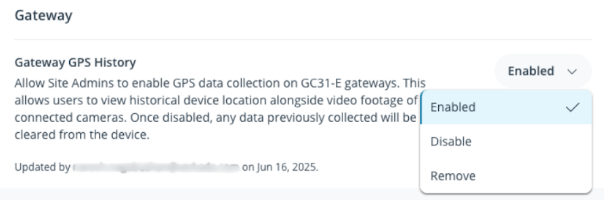
**Under Gateway > Gateway GPS History, select Enabled from the dropdown menu.**
{% endstep %}
{% endstepper %}
### Verkada Cellular Gateway
{% stepper %}
{% step %}
**In Verkada Command, go to All Products > Gateways.**
{% endstep %}
{% step %}
**Select the gateway you want to configure.**
{% endstep %}
{% step %}
**In the top right, click Settings.**
{% endstep %}
{% step %}
**Under GPS > GPS History, select On from the dropdown menu. Once enabled, you can access the feature from the gateway details page.**
{% endstep %}
{% endstepper %}
The gateway will begin reporting historical GPS coordinates, which can assist with investigations and general vehicle tracking.
***
## View signal coverage data from GPS History
{% stepper %}
{% step %}
**In Verkada Command, go to All Products > Gateways.**
{% endstep %}
{% step %}
**Select the gateway you want to view.**
{% endstep %}
{% step %}
**Click GPS History.**
a. Toggle on **Signal Strength** to view the historical carrier signal data along the gateway’s route.\
b. Once toggled on, you can view carrier information along the gateway’s route.
{% endstep %}
{% endstepper %}
***
## FAQ
How often does the gateway collect GPS data?
The GC31-E samples GPS data every 10 seconds.
How often is GPS data uploaded to the cloud?
GPS data is uploaded to the cloud every 2 minutes.
Is cellular connectivity required to upload GPS data to the cloud?
GPS sampling occurs without cellular connectivity, but uploading the data to the cloud requires a cellular connection on the GC31-E.
How accurate is the reported GPS location?
The Cellular Gateway’s GPS provides an accuracy of approximately ±50 meters.
---
# Agent Instructions
This documentation is published with GitBook. GitBook is the documentation platform designed so that both humans and AI agents can read, navigate, and reason over technical content effectively. Learn more at gitbook.com.
## Querying This Documentation
If you need additional information that is not directly available in this page, you can query the documentation by asking a question.
Perform an HTTP GET request on the following URL with the `ask` and `goal` query parameters:
```
GET https://help.verkada.com/connectivity/configuration/add-cellular-gateway-to-command/enable-historical-gps-data-on-gc31-e-gateways.md?ask=&goal=
```
`ask` is the immediate question: it should be specific, self-contained, and written in natural language.
`goal` is what the user is ultimately trying to achieve, the reason they need the answer. Sharing it helps GitBook give you a better, more relevant answer. A goal is most helpful when it describes the outcome the user wants rather than restating the question. For example, with `ask=how do I create an API token`, a goal like `automate deployments from our CI pipeline` lets GitBook tailor the answer to that use case.
The response will contain a direct answer to the question and relevant excerpts and sources from the documentation.
Use this mechanism when the answer is not explicitly present in the current page, you need clarification or additional context, or you want to retrieve related documentation sections.