> For the complete documentation index, see [llms.txt](https://help.verkada.com/llms.txt). Markdown versions of documentation pages are available by appending `.md` to page URLs; this page is available as [Markdown](https://help.verkada.com/command/organization-settings/integrations/set-up-the-verkada-hivewatch-integration.md).
# HiveWatch
The HiveWatch Global Security Operations Center (GSOC) Operating System (OS) is a comprehensive Security Operations Management Platform designed to centralize and streamline various security systems, enhancing operational efficiency. This platform empowers physical security teams to make informed, data-driven decisions.
By integrating with Verkada, Command users can seamlessly connect their HiveWatch GSOC OS with Verkada security cameras and access control devices, providing a unified interface for security operators. This integration allows users to review access control events in real-time through synchronized Verkada camera feeds within the HiveWatch GSOC OS.
### What you need
* [Verkada organization ID](#h_da42c17b67)
* [Verkada API Keys](#h_611b1b0a99):
* Read Only
* Streaming - Live/Historical
* [Cameras](#h_ab28f0de7b)
* Camera names
* Camera IDs
* [Access control](#h_9aab16a63e)
* Access controller IDs
* Door names
* Door IDs
* [Verkada Webhook Secret](#h_d5448bc001)
***
## Organization configuration
### Locate your organization ID
{% stepper %}
{% step %}
**In Verkada Command, go to All Products > Admin .**
{% endstep %}
{% step %}
**In the left navigation, select Org Settings > Verkada API.**
{% endstep %}
{% step %}
**Copy the Organization ID and store it in a secure place.**
{% endstep %}
{% endstepper %}
### Create an API key
{% stepper %}
{% step %}
**In Verkada Command, go to All Products > Admin .**
{% endstep %}
{% step %}
**In the left navigation, select Org Settings > Verkada API.**
{% endstep %}
{% step %}
**Read Only key:**
a. Click **Add API Key.**\
b. Enter a unique name.\
c. Set **Select Permission** to **Read only.**\
d. Set the **Expiration.Note:** We recommend setting the API key’s expiration date to a year from the current date. It is recommended to rotate API keys at least once a year.\
e. Click **Generate API Key > Copy.** The API key is only displayed once. Copy the key and store it in a secure place.
{% endstep %}
{% step %}
**Streaming - Live/Historical key:**
a. Click **Add API Key.**\
b. Enter a unique name.\
c. Set **Select Permission** to **Streaming - Live/Historical.**\
d. Set the **Expiration.Note:** We recommend setting the API key’s expiration date to a year from the current date. It is recommended to rotate API keys at least once a year.\
e. Select the sites/devices the key will apply to.\
f. Click **Generate API Key > Copy.** The API key is only displayed once. Copy the key and store it in a secure place.
{% endstep %}
{% endstepper %}
***
## Gather device info
### Cameras
You need to retrieve the camera name and camera ID for each camera that will be part of the HiveWatch organization.
{% stepper %}
{% step %}
**In Verkada Command, go to All Products > Cameras.**
**Note:** The HiveWatch team can assist in collecting this information for large-scale deployments. Reach out to your HiveWatch representative for assistance.
{% endstep %}
{% step %}
**Select a camera site and below the video player, click Settings.**
{% endstep %}
{% step %}
**Under General, copy the camera name and store it in a secure location.**
{% endstep %}
{% step %}
**The camera ID can be found in the browser URL. Copy the camera ID and store it with the camera name.**
{% endstep %}
{% endstepper %}
### Access control
You need to retrieve the access controller ID, door name, and door ID from Command for each door that will be a part of the HiveWatch integration.
{% stepper %}
{% step %}
**In Verkada Command, go to All Products > Access.**
{% endstep %}
{% step %}
**Gather controller info:**
a. At the top, select **Controllers.**\
b. Select a controller and click the controller image on the right.\
c. The controller ID can be found in the browser URL. Copy the controller ID and store it in a secure location.
{% endstep %}
{% step %}
**Gather door info:**
a. Hover over a door and click .\
b. Under **General,** copy the door name and store it with the controller ID.\
c. The door ID can be found in the browser URL. Copy the door ID and store it with the door name.
{% endstep %}
{% step %}
**Click into a controller that will be used for the HiveWatch integration and copy the controller’s ID from the browser URL.**
{% endstep %}
{% endstepper %}
{% hint style="danger" %}
Contact your HiveWatch representative and provide them with the corresponding Verkada device information and API keys to complete the integration setup.
{% endhint %}
***
## Create a Verkada Webhook
{% hint style="warning" %}
The HiveWatch Implementation team will provide a unique integration URL and Shared Secret for the Webhook.
{% endhint %}
{% stepper %}
{% step %}
**In Verkada Command, go to All Products > Admin .**
{% endstep %}
{% step %}
**In the left navigation, select Org Settings > Verkada API.**
{% endstep %}
{% step %}
**Click Add Webhook.**
a. Enter the provided **Webhook URL.**\
b. Enter the provided **Shared Secrect.**\
c. Click **Add Webhook.**
{% endstep %}
{% endstepper %}
Users now have all the required Verkada information to integrate with Verkada devices into HiveWatch’s GSOC.
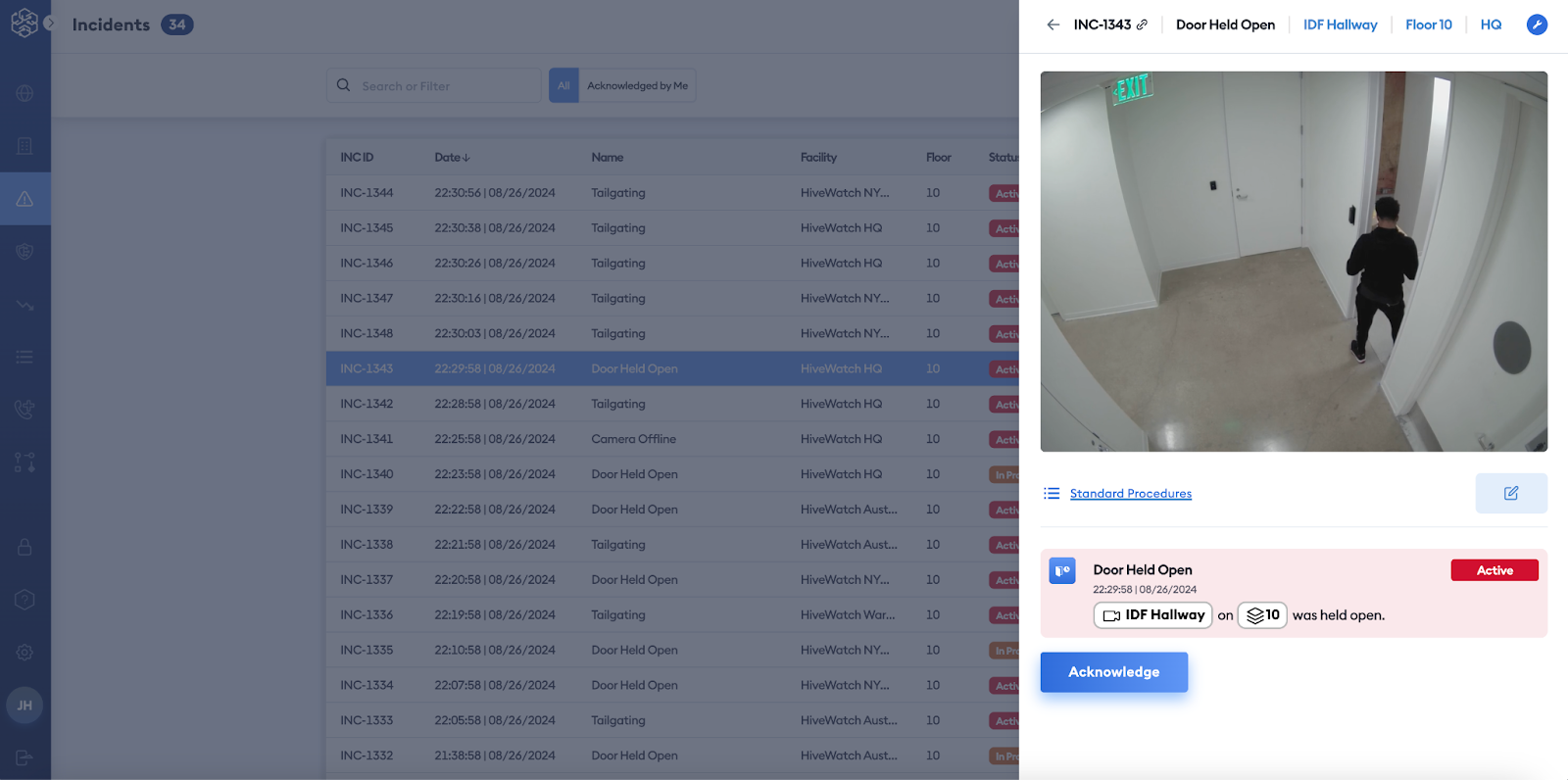
The image below shows a completed integration between Verkada and HiveWatch. It displays a Verkada Door Held Open event raised within the HiveWatch GSOC, accompanied by the corresponding Verkada camera feed. This setup allows for efficient event review and response.
---
# Agent Instructions
This documentation is published with GitBook. GitBook is the documentation platform designed so that both humans and AI agents can read, navigate, and reason over technical content effectively. Learn more at gitbook.com.
## Querying This Documentation
If you need additional information that is not directly available in this page, you can query the documentation dynamically by asking a question.
Perform an HTTP GET request on the current page URL with the `ask` query parameter, and the optional `goal` query parameter:
```
GET https://help.verkada.com/command/organization-settings/integrations/set-up-the-verkada-hivewatch-integration.md?ask=&goal=
```
`ask` is the immediate question: it should be specific, self-contained, and written in natural language.
`goal` is optional and describes the broader end goal you are ultimately trying to accomplish on behalf of the user. GitBook uses it to tailor the answer towards what is most useful for that goal.
The response will contain a direct answer to the question and relevant excerpts and sources from the documentation.
Use this mechanism when the answer is not explicitly present in the current page, you need clarification or additional context, or you want to retrieve related documentation sections.