> For the complete documentation index, see [llms.txt](https://help.verkada.com/llms.txt). Markdown versions of documentation pages are available by appending `.md` to page URLs; this page is available as [Markdown](https://help.verkada.com/command/ja/sekyuriti/privacy-and-security-disclosure.md).
# データ保護
プライバシー機能を有効にして、Verkada Commandオーガナイゼーション'のセキュリティを強化する方法を学ぶ
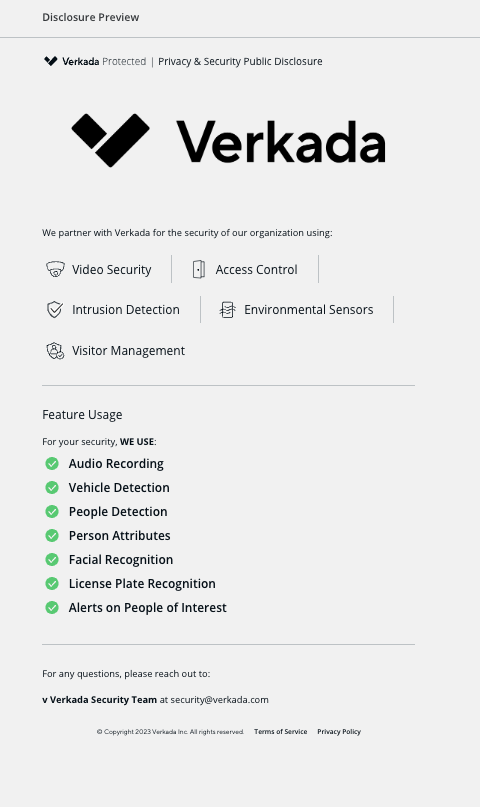
プライバシーおよびセキュリティに関する開示により、インストールされている Verkada 製品、有効になっている分析機能、そしてプライバシー保護のためにオーガナイゼーション'が使用しないことを選択した機能を確認できます。
***
## 開示を作成
オーガナイゼーション'全体に対して 1 つの開示を作成することも、各サイトで使用されている機能に応じて、サイトごとに個別の開示を作成することもできます。
{% stepper %}
{% step %}
**Verkada Command で、All Products > Admin に移動します。**
{% endstep %}
{% step %}
**左側のナビゲーションで、[データ プライバシー]>[公開開示]を選択します。**
{% endstep %}
{% step %}
**上部で、開示のドロップダウンをクリックし、[新規作成]を選択します。**
{% endstep %}
{% step %}
**[開示を作成]パネルでは、**
a. **必須**. サイト名を入力し、この開示のサイトを選択します。\
b. 会社のロゴをアップロードします。
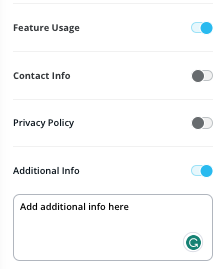
c. (オプション)必要に応じて、追加情報(機能の使用状況、連絡先情報、プライバシーポリシー)をオンにします。
{% endstep %}
{% step %}
**完了したら、右上の[公開]をクリックします。確認のため開示のプレビューが表示されます。**
{% endstep %}
{% endstepper %}
***
## 開示を共有
開示を公開すると、共有できるようになります。
{% stepper %}
{% step %}
**プレビューページの右上で、三点メニュー(縦の3点)アイコンをクリックします。**
{% endstep %}
{% step %}
**一覧から、以下のいずれかを生成する共有方法を選択できます。**
* **QR コード**—サイト内に物理的に掲示したり、インターネット経由で共有したりできるダウンロード可能な QR コード。
* **リンクをコピー**—インターネット経由で共有でき、開示の Web 版を提供するハイパーリンク。
* **印刷**—印刷可能なプライバシー開示のダウンロード可能な PDF。
{% endstep %}
{% endstepper %}
{% hint style="warning" %}
プライバシー開示を公開すると、リンクは一般に公開されますが、宣伝されたり自動的に共有されたりすることはありません。プライバシー開示を共有するためにハイパーリンクを使用する予定の場合は、自分で周知する必要があります。
{% endhint %}
---
# Agent Instructions
This documentation is published with GitBook. GitBook is the documentation platform designed so that both humans and AI agents can read, navigate, and reason over technical content effectively. Learn more at gitbook.com.
## Querying This Documentation
If you need additional information that is not directly available in this page, you can query the documentation by asking a question.
Perform an HTTP GET request on the following URL with the `ask` and `goal` query parameters:
```
GET https://help.verkada.com/command/ja/sekyuriti/privacy-and-security-disclosure.md?ask=&goal=
```
`ask` is the immediate question: it should be specific, self-contained, and written in natural language.
`goal` is what the user is ultimately trying to achieve, the reason they need the answer. Sharing it helps GitBook give you a better, more relevant answer. A goal is most helpful when it describes the outcome the user wants rather than restating the question. For example, with `ask=how do I create an API token`, a goal like `automate deployments from our CI pipeline` lets GitBook tailor the answer to that use case.
The response will contain a direct answer to the question and relevant excerpts and sources from the documentation.
Use this mechanism when the answer is not explicitly present in the current page, you need clarification or additional context, or you want to retrieve related documentation sections.