> For the complete documentation index, see [llms.txt](https://help.verkada.com/llms.txt). Markdown versions of documentation pages are available by appending `.md` to page URLs; this page is available as [Markdown](https://help.verkada.com/command-connector/ja/she-ding/change-a-non-verkada-camera-resolution.md).
# 非Verkadaカメラの解像度を変更する
アスペクト比を調整したり、より多くのチャンネルを得るために、非Verkadaカメラの解像度を変更します。
Command Connectorを介してCommandに接続されたVerkada以外の一部のカメラでは、特定のアスペクト比を実現したり、ストレージ効率を高めたりするために解像度を調整できます。これは、4KやFisheyeモデルなどの広角カメラで特に有用です。
#### ユースケース
* **1:1比率:** 一部のカメラモデル、特にマルチセンサーやパノラマカメラでは、ネイティブ解像度が16:9ではありません。1:1比率に設定すると、これらのカメラの画像の整合性を維持するのに役立ちます。
* **パフォーマンス:** 単一の高解像度映像をストリーミングする代わりに、複数の低解像度映像をストリーミングすることで、カメラとネットワークの両方の帯域幅と処理負荷を削減できます。
* **ストレージ負荷の軽減:** 解像度を下げると動画ファイルのサイズが小さくなり、Command Connector上のローカルストレージの使用量が減るため、ほかの接続済みカメラの保存期間をより長くできます。
* **チャネル最適化:** 複数のチャネルを使用しているカメラは1つのチャネルに統合でき、同じCommand Connector上で新しいカメラのための容量を確保できます。詳細は [Verkada以外のカメラでストレージ設定を変更する](/command-connector/ja/she-ding/change-storage-settings-on-non-verkada-cameras.md) 詳細については
***
## 設定
{% stepper %}
{% step %}
**Verkada Commandで、すべての製品 > カメラに移動します。**
{% endstep %}
{% step %}
**設定するVerkada以外のチャネルを選択します。**
{% endstep %}
{% step %}
**右下で[設定]をクリックします。**
{% endstep %}
{% step %}
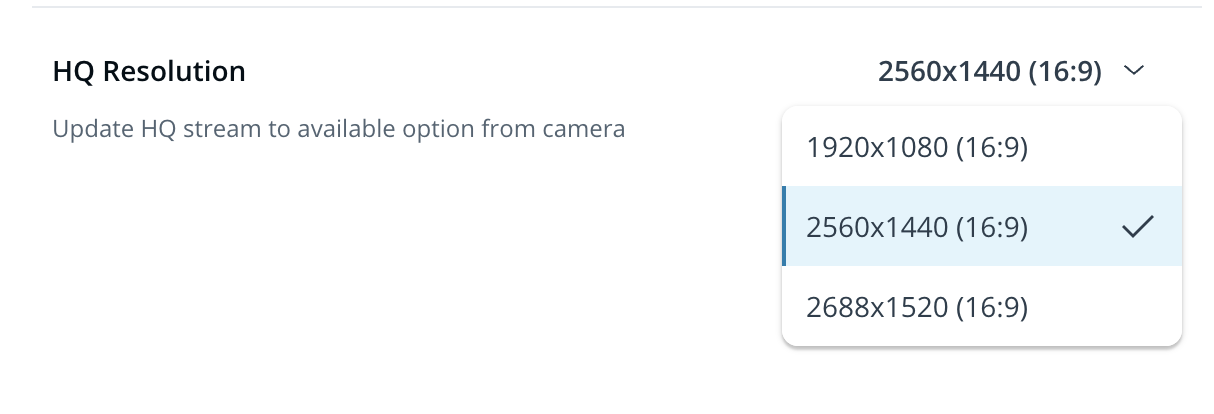
**[ストリーミング機能]で、HQ解像度の横にある解像度を選択します。**
{% endstep %}
{% endstepper %}
{% hint style="danger" %}
解像度を変更できないのは **ストリーミング機能プロファイルの選択** が次に設定されている場合 **メーカー**.
{% endhint %}
{% hint style="warning" %}
カスタムのアスペクト比はHQ映像でのみ利用できます。SQ映像では、Command Connectorが最適なストリーミング機能とストレージを維持するために、アスペクト比を自動的に調整します。
{% endhint %}
{% hint style="danger" %}
すべてのVerkada以外のカメラで、すべての解像度が利用できるわけではありません。
{% endhint %}
---
# Agent Instructions
This documentation is published with GitBook. GitBook is the documentation platform designed so that both humans and AI agents can read, navigate, and reason over technical content effectively. Learn more at gitbook.com.
## Querying This Documentation
If you need additional information that is not directly available in this page, you can query the documentation by asking a question.
Perform an HTTP GET request on the following URL with the `ask` and `goal` query parameters:
```
GET https://help.verkada.com/command-connector/ja/she-ding/change-a-non-verkada-camera-resolution.md?ask=&goal=
```
`ask` is the immediate question: it should be specific, self-contained, and written in natural language.
`goal` is what the user is ultimately trying to achieve, the reason they need the answer. Sharing it helps GitBook give you a better, more relevant answer. A goal is most helpful when it describes the outcome the user wants rather than restating the question. For example, with `ask=how do I create an API token`, a goal like `automate deployments from our CI pipeline` lets GitBook tailor the answer to that use case.
The response will contain a direct answer to the question and relevant excerpts and sources from the documentation.
Use this mechanism when the answer is not explicitly present in the current page, you need clarification or additional context, or you want to retrieve related documentation sections.