> For the complete documentation index, see [llms.txt](https://help.verkada.com/llms.txt). Markdown versions of documentation pages are available by appending `.md` to page URLs; this page is available as [Markdown](https://help.verkada.com/command-connector/configuration/change-storage-settings-on-non-verkada-cameras.md).
# Change Storage Settings on Non-Verkada Cameras
Set the storage retention for your non-Verkada cameras
The Command Connector allows non-Verkada cameras (channels) to store between 0 and 90 days of continuously recorded video in adaptive quality.
Newly added cameras default to 30 days of available footage. The allocated storage space for each camera can be reconfigured as needed as long as the total usable storage capacity on the Command Connector is not exceeded.
## Configure retention on non-Verkada cameras
{% hint style="danger" %}
You must be an Org Admin or Site Admin for the site the Command Connector is in **and** the site the non-Verkada camera is in. See [Roles and Permissions for Cameras](/verkada-cameras/getting-started/roles-and-permissions-for-cameras.md) for more information.
{% endhint %}
Retention can be configured from the non-Verkada camera’s settings page or through the list of channels currently connected to the Command Connector.
{% hint style="warning" %}
If the retention period is reduced, any footage older than the new retention period will be immediately marked for deletion and lost.
{% endhint %}
#### Camera settings page
{% stepper %}
{% step %}
**In Verkada Command, navigate to All Products > Cameras.**
{% endstep %}
{% step %}
**Select a non-Verkada camera.**
{% endstep %}
{% step %}
**At the bottom right of the camera feed, click Settings.**
{% endstep %}
{% step %}
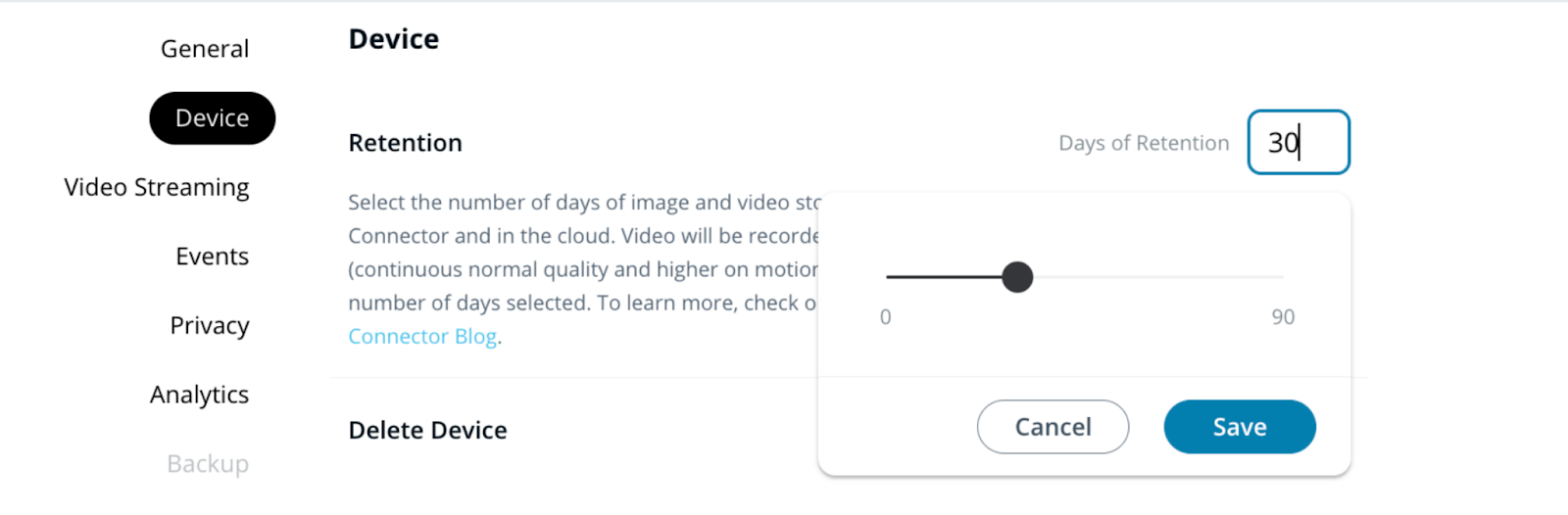
**Under Device > Retention, enter a retention duration between 0 and 90 days.**
{% endstep %}
{% endstepper %}
#### Command Connector page
{% stepper %}
{% step %}
**In Verkada Command, go to All Products > Devices .**
{% endstep %}
{% step %}
**Select the Command Connector, and on the right, click .**
{% endstep %}
{% step %}
**Select > Edit Settings next to a camera (channel) to view the settings.**
{% endstep %}
{% endstepper %}
#### Under **Device** > **Retention,** enter a retention duration between 0 and 90 days.
#### Command Connector page (Bulk)
{% stepper %}
{% step %}
**In Verkada Command, go to All Products > Devices.**
{% endstep %}
{% step %}
**Select the Command Connector, and on the right, click** :arrow-right:**.**
{% endstep %}
{% step %}
**Select multiple non-Verkada Channels using the checkboxes.**
{% endstep %}
{% step %}
**Select Edit Settings at the top of the channel list (channel) to view the settings.**
{% endstep %}
{% step %}
**Under Device > Retention, enter a retention duration between 0 and 90 days.**
{% endstep %}
{% endstepper %}
***
## Storage availability on the Command Connector
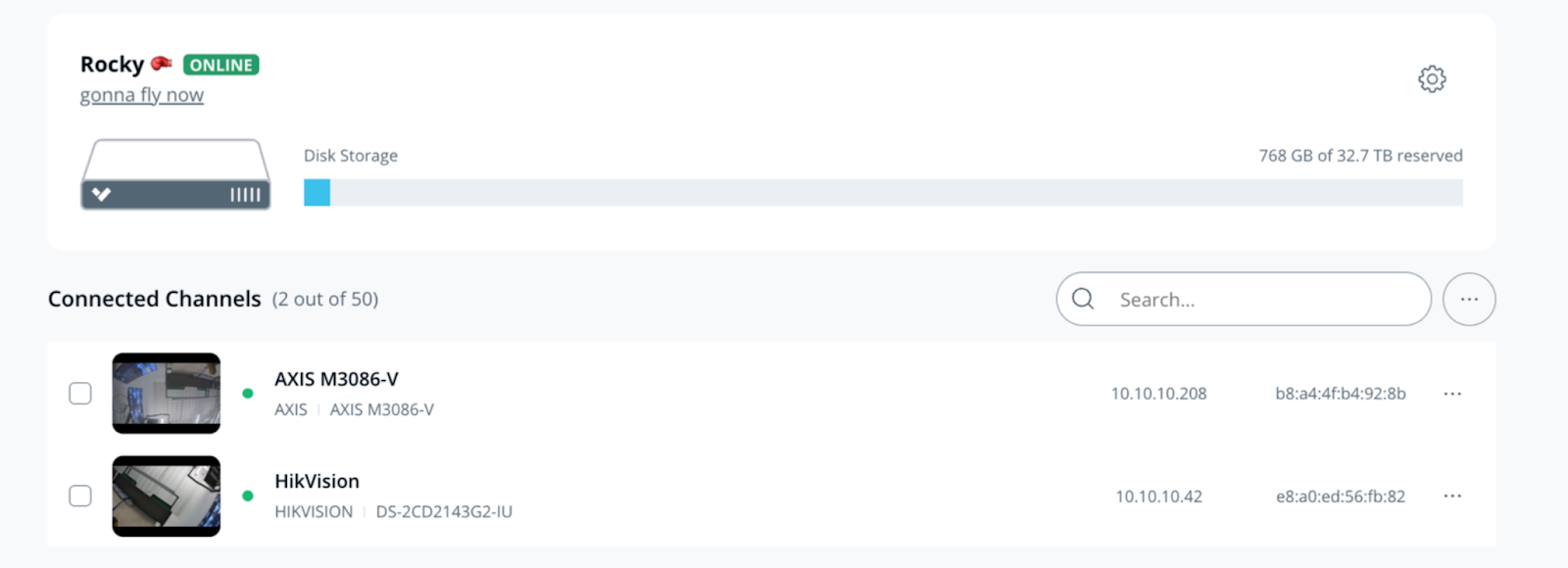
The amount of currently reserved and free storage space is listed on the homepage of the Command Connector.
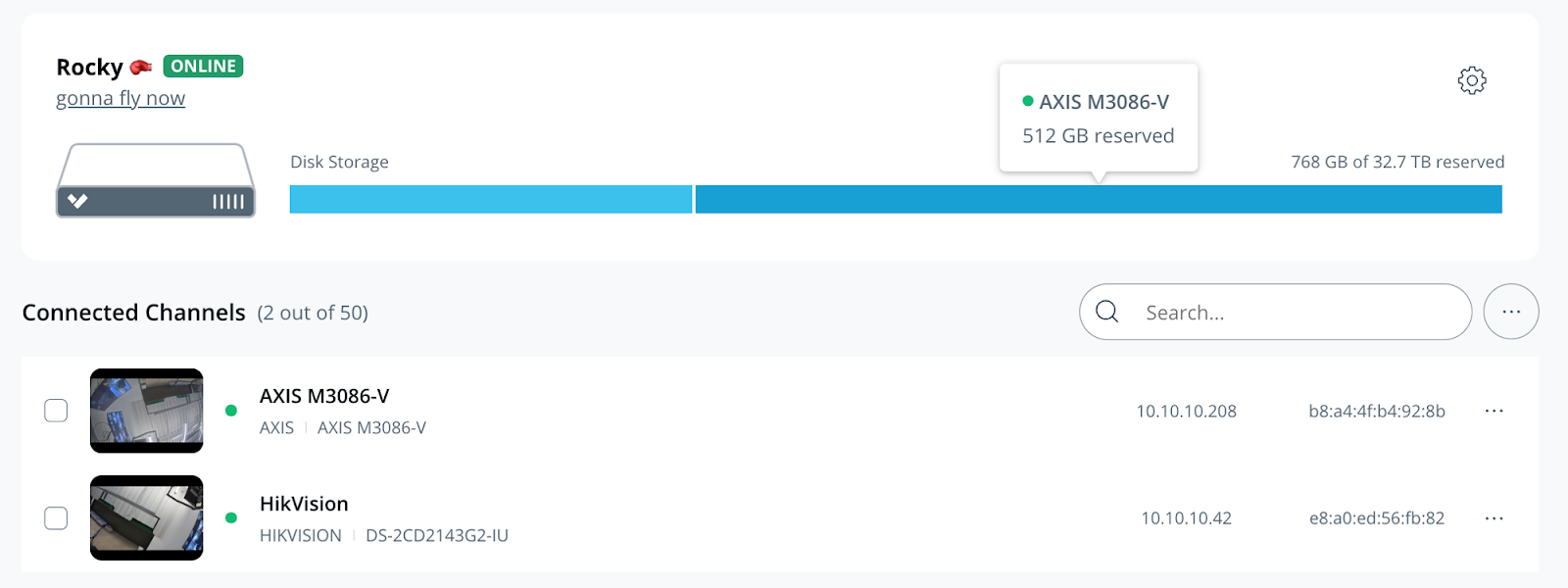
Toggle the **Disk Storage** to the camera view  and hover the cursor over the consumption bar to view the amount of storage currently reserved by each camera.
The amount of storage reserved for each channel on the Command Connector will vary based on the camera’s resolution and the days of retention configured.
#### 5MP Standard Channel
| Days of Retention | Reserved Storage Capacity |
| ----------------- | ------------------------- |
| 30 Days | 256GB |
| 60 Days | 512GB |
| 90 Days | 768GB |
#### 4K High-Res Channel
| Days of Retention | Reserved Storage Capacity |
| ----------------- | ------------------------- |
| 30 Days | 512GB |
| 60 Days | 1TB |
| 90 Days | 2TB |
### Storage Allocation
When the storage allocation is adjusted, the Command Connector ensures the storage capacity is optimized without compromising data retention needs.
* **Increasing Retention:** The Command Connector automatically adjusts the storage allocation based on the new retention period. For instance, a 5MP camera set to 30 days reserves 256GB. If you extend the retention to 31 days, the allocation increases to 512GB, which remains fixed for up to 60 days.
* **Reducing Retention:** The Command Connector verifies if the allocated storage meets the new requirements. If less storage is needed, the allocation may be reduced, but it will not fall below the minimum reserved size for the camera. For instance, a 5MP camera set to less than 30 days will not reserve less than 256GB.
If a Command Connector has channels configured with retention periods exceeding its maximum total capacity (a channel configured for more than 30 days retention for a 30-day Command Connector), these strategies can be followed:
* **Prioritize critical channels:** Identify the most critical cameras that require extended retention and configure them with higher retention periods. For less critical channels, consider reducing the retention.
* **Reduce the number of channels:** Delete some of the existing channels and allocate the freed-up storage to the cameras that need higher retention.
---
# Agent Instructions
This documentation is published with GitBook. GitBook is the documentation platform designed so that both humans and AI agents can read, navigate, and reason over technical content effectively. Learn more at gitbook.com.
## Querying This Documentation
If you need additional information that is not directly available in this page, you can query the documentation by asking a question.
Perform an HTTP GET request on the following URL with the `ask` and `goal` query parameters:
```
GET https://help.verkada.com/command-connector/configuration/change-storage-settings-on-non-verkada-cameras.md?ask=&goal=
```
`ask` is the immediate question: it should be specific, self-contained, and written in natural language.
`goal` is what the user is ultimately trying to achieve, the reason they need the answer. Sharing it helps GitBook give you a better, more relevant answer. A goal is most helpful when it describes the outcome the user wants rather than restating the question. For example, with `ask=how do I create an API token`, a goal like `automate deployments from our CI pipeline` lets GitBook tailor the answer to that use case.
The response will contain a direct answer to the question and relevant excerpts and sources from the documentation.
Use this mechanism when the answer is not explicitly present in the current page, you need clarification or additional context, or you want to retrieve related documentation sections.
and hover the cursor over the consumption bar to view the amount of storage currently reserved by each camera.
The amount of storage reserved for each channel on the Command Connector will vary based on the camera’s resolution and the days of retention configured.
#### 5MP Standard Channel
| Days of Retention | Reserved Storage Capacity |
| ----------------- | ------------------------- |
| 30 Days | 256GB |
| 60 Days | 512GB |
| 90 Days | 768GB |
#### 4K High-Res Channel
| Days of Retention | Reserved Storage Capacity |
| ----------------- | ------------------------- |
| 30 Days | 512GB |
| 60 Days | 1TB |
| 90 Days | 2TB |
### Storage Allocation
When the storage allocation is adjusted, the Command Connector ensures the storage capacity is optimized without compromising data retention needs.
* **Increasing Retention:** The Command Connector automatically adjusts the storage allocation based on the new retention period. For instance, a 5MP camera set to 30 days reserves 256GB. If you extend the retention to 31 days, the allocation increases to 512GB, which remains fixed for up to 60 days.
* **Reducing Retention:** The Command Connector verifies if the allocated storage meets the new requirements. If less storage is needed, the allocation may be reduced, but it will not fall below the minimum reserved size for the camera. For instance, a 5MP camera set to less than 30 days will not reserve less than 256GB.
If a Command Connector has channels configured with retention periods exceeding its maximum total capacity (a channel configured for more than 30 days retention for a 30-day Command Connector), these strategies can be followed:
* **Prioritize critical channels:** Identify the most critical cameras that require extended retention and configure them with higher retention periods. For less critical channels, consider reducing the retention.
* **Reduce the number of channels:** Delete some of the existing channels and allocate the freed-up storage to the cameras that need higher retention.
---
# Agent Instructions
This documentation is published with GitBook. GitBook is the documentation platform designed so that both humans and AI agents can read, navigate, and reason over technical content effectively. Learn more at gitbook.com.
## Querying This Documentation
If you need additional information that is not directly available in this page, you can query the documentation by asking a question.
Perform an HTTP GET request on the following URL with the `ask` and `goal` query parameters:
```
GET https://help.verkada.com/command-connector/configuration/change-storage-settings-on-non-verkada-cameras.md?ask=&goal=
```
`ask` is the immediate question: it should be specific, self-contained, and written in natural language.
`goal` is what the user is ultimately trying to achieve, the reason they need the answer. Sharing it helps GitBook give you a better, more relevant answer. A goal is most helpful when it describes the outcome the user wants rather than restating the question. For example, with `ask=how do I create an API token`, a goal like `automate deployments from our CI pipeline` lets GitBook tailor the answer to that use case.
The response will contain a direct answer to the question and relevant excerpts and sources from the documentation.
Use this mechanism when the answer is not explicitly present in the current page, you need clarification or additional context, or you want to retrieve related documentation sections.