> For the complete documentation index, see [llms.txt](https://help.verkada.com/llms.txt). Markdown versions of documentation pages are available by appending `.md` to page URLs; this page is available as [Markdown](https://help.verkada.com/classic-alarms/ja/she-ding/configure-classic-alarms-site-settings/generate-a-user-or-general-keycode-with-classic-alarms.md).
# ユーザーまたは一般キーコードを生成する
キーコードの違いとキーコードの生成方法を学ぶ
{% hint style="success" %}
Verkadaは、Classic Alarmsの全世界での販売終了日(2026年8月1日)および製品終了日(2027年8月1日)を発表しました。対象のお客様は、2027年1月31日まで追加費用なしでNew Alarmsにアップグレードできます。アクセス [Verkada.com/alarms/upgrade](https://www.verkada.com/alarms/upgrade) 開始するには。
{% endhint %}
{% hint style="success" %}
この記事はクラシック アラーム向けのガイドです。こちらを参照してください [記事](/new-alarms/ja/she-ding/alarm-sites/configure-new-alarms-site-settings.md) 新しいアラームをお使いの場合は、以下をご覧ください。 [新しいアラーム vs クラシック アラーム](/new-alarms/ja/hajimeni/new-alarms-vs-classic-alarms.md) どのバージョンのアラームをお使いか不明な場合は。
{% endhint %}
***
**ユーザーのキーコード** は個別のアカウントに関連付けられており、独自のキーコードとサイト権限を通じて各ユーザーのアラームシステムの警戒設定/警戒解除権限を管理できるという利点があります。
**一般キーコード** は個別のアカウントに関連付けられておらず、代わりに汎用名が付けられ、 **1つのアラームサイト専用です**。目的は、清掃スタッフなどの特定のグループが使用するための一般キーコード、またはその特定サイトの緊急時用のマスターキーコードを作成することです。
***
## キーコードを生成する
{% hint style="danger" %}
キーコードを生成する前に、Org Admin である必要があり、アカウント権限を確認する必要があります。
{% endhint %}
{% stepper %}
{% step %}
**Verkada Command で、移動** **へ** **すべての製品** > **クラシック** **アラーム。**\
* 移動してください **すべての製品** > **クラシック** **アラーム > サイトを選択 > 設定 > ユーザーとキーコード > ユーザーを検索 > コードを生成**。\
{% endstep %}
{% step %}
**サイトを選択 > 設定。**
{% endstep %}
{% step %}
**〜の下の** **ユーザーとキーコード > ユーザーを検索 > コードを生成**.
{% endstep %}
{% step %}
**コードの横にある**  **をクリックして、事前生成されたコードを変更します。**
{% endstep %}
{% endstepper %}
{% hint style="warning" %}
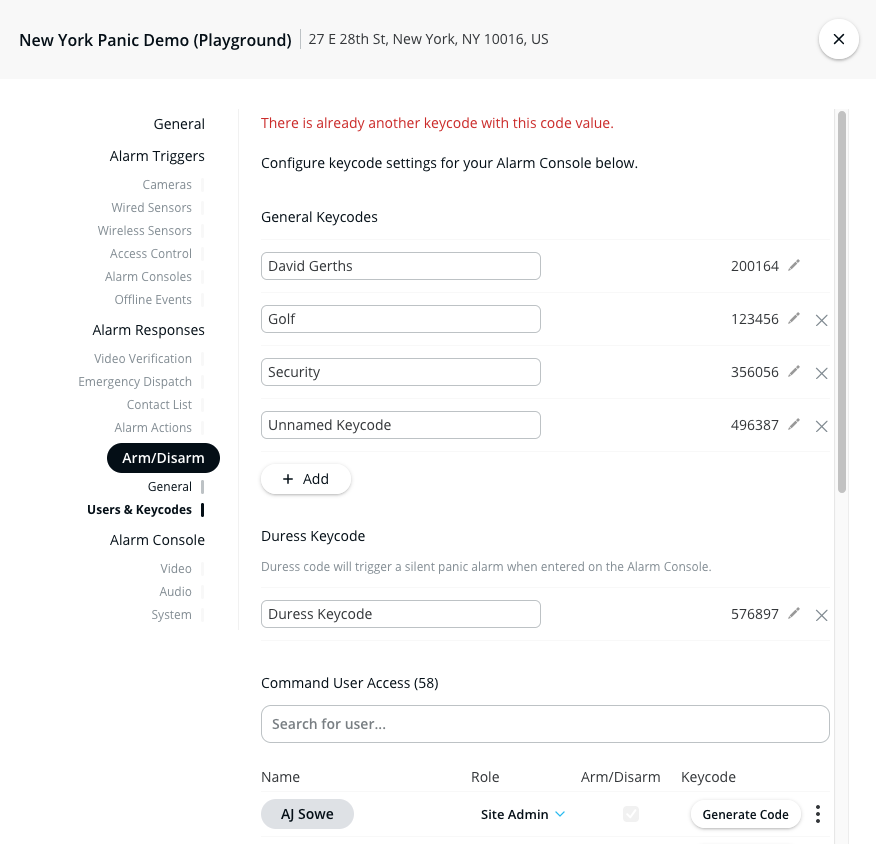
ユーザーのキーコードと一般キーコードは互いに競合できません。Command アカウントに既に存在するコードを入力すると、エラーが表示されます。
**をクリックして、事前生成されたコードを変更します。**
{% endstep %}
{% endstepper %}
{% hint style="warning" %}
ユーザーのキーコードと一般キーコードは互いに競合できません。Command アカウントに既に存在するコードを入力すると、エラーが表示されます。
 {% endhint %}
{% hint style="danger" %}
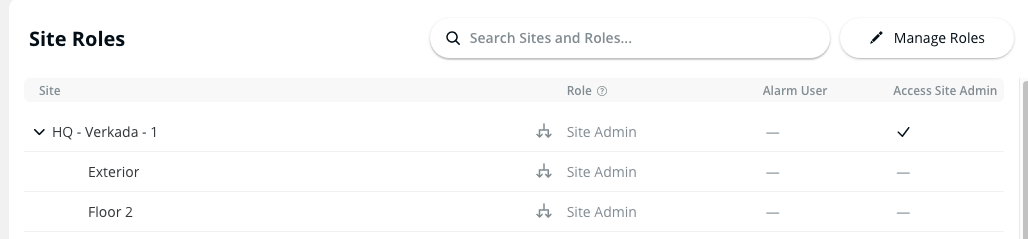
あなたは **必ず** このコードはユーザーアカウントに紐づいており、使用するにはアラームのユーザー権限が必要です。ただし、Site Admin の場合は、そのサイトのアラームユーザーがデフォルトで付与されます。これにより、ユーザーにサイトの警戒設定と警戒解除の権限を付与し、カメラ閲覧を制限できます。
{% endhint %}
警戒設定/警戒解除が必要なアラームサイトが多数ある場合は、ユーザーごとに各サイトの一般キーコードを設定する代わりに、それらの権限を指定できます。
---
# Agent Instructions
This documentation is published with GitBook. GitBook is the documentation platform designed so that both humans and AI agents can read, navigate, and reason over technical content effectively. Learn more at gitbook.com.
## Querying This Documentation
If you need additional information that is not directly available in this page, you can query the documentation by asking a question.
Perform an HTTP GET request on the following URL with the `ask` and `goal` query parameters:
```
GET https://help.verkada.com/classic-alarms/ja/she-ding/configure-classic-alarms-site-settings/generate-a-user-or-general-keycode-with-classic-alarms.md?ask=&goal=
```
`ask` is the immediate question: it should be specific, self-contained, and written in natural language.
`goal` is what the user is ultimately trying to achieve, the reason they need the answer. Sharing it helps GitBook give you a better, more relevant answer. A goal is most helpful when it describes the outcome the user wants rather than restating the question. For example, with `ask=how do I create an API token`, a goal like `automate deployments from our CI pipeline` lets GitBook tailor the answer to that use case.
The response will contain a direct answer to the question and relevant excerpts and sources from the documentation.
Use this mechanism when the answer is not explicitly present in the current page, you need clarification or additional context, or you want to retrieve related documentation sections.
{% endhint %}
{% hint style="danger" %}
あなたは **必ず** このコードはユーザーアカウントに紐づいており、使用するにはアラームのユーザー権限が必要です。ただし、Site Admin の場合は、そのサイトのアラームユーザーがデフォルトで付与されます。これにより、ユーザーにサイトの警戒設定と警戒解除の権限を付与し、カメラ閲覧を制限できます。
{% endhint %}
警戒設定/警戒解除が必要なアラームサイトが多数ある場合は、ユーザーごとに各サイトの一般キーコードを設定する代わりに、それらの権限を指定できます。
---
# Agent Instructions
This documentation is published with GitBook. GitBook is the documentation platform designed so that both humans and AI agents can read, navigate, and reason over technical content effectively. Learn more at gitbook.com.
## Querying This Documentation
If you need additional information that is not directly available in this page, you can query the documentation by asking a question.
Perform an HTTP GET request on the following URL with the `ask` and `goal` query parameters:
```
GET https://help.verkada.com/classic-alarms/ja/she-ding/configure-classic-alarms-site-settings/generate-a-user-or-general-keycode-with-classic-alarms.md?ask=&goal=
```
`ask` is the immediate question: it should be specific, self-contained, and written in natural language.
`goal` is what the user is ultimately trying to achieve, the reason they need the answer. Sharing it helps GitBook give you a better, more relevant answer. A goal is most helpful when it describes the outcome the user wants rather than restating the question. For example, with `ask=how do I create an API token`, a goal like `automate deployments from our CI pipeline` lets GitBook tailor the answer to that use case.
The response will contain a direct answer to the question and relevant excerpts and sources from the documentation.
Use this mechanism when the answer is not explicitly present in the current page, you need clarification or additional context, or you want to retrieve related documentation sections.