> For the complete documentation index, see [llms.txt](https://help.verkada.com/llms.txt). Markdown versions of documentation pages are available by appending `.md` to page URLs; this page is available as [Markdown](https://help.verkada.com/classic-alarms/events-and-alerts/configure-alarms-event-alerts/configure-camera-alarm-trigger-events.md).
# Configure Camera Alarm Trigger Events
Learn how to configure your camera for alarm trigger alerts
{% hint style="success" %}
Verkada announced the global End of Sale (August 1, 2026) and End of Life (August 1, 2027) for Classic Alarms. Eligible customers can upgrade to New Alarms at no charge through January 31, 2027. Visit [Verkada.com/alarms/upgrade](https://www.verkada.com/alarms/upgrade) to get started.
{% endhint %}
Verkada’s camera alarm triggers provide additional information to the monitoring agent to determine if the event is a threat to a person or property. You can also get [alerts](/classic-alarms/events-and-alerts/configure-alarms-event-alerts.md) based on the alarm triggers configured.
{% hint style="warning" %}
Vehicle detection events are **not video-verified** and will automatically raise an alarm.
{% endhint %}
For more information on the types of alarm triggers see below:
* [Person detection](#h_0f8f2047f8)
* [Line crossing](#h_71ccaf8225)
* [Loitering](#h_f4fc8818d9)
## When should a detection occur?
When a Verkada camera detects an object, green bounding boxes appear over the detected object(s). You can see these bounding boxes when scrubbing through a camera’s [people and vehicle motion search](/verkada-cameras/analytics/people-and-vehicle-motion-search.md) or scrubbing through a camera’s historical video.
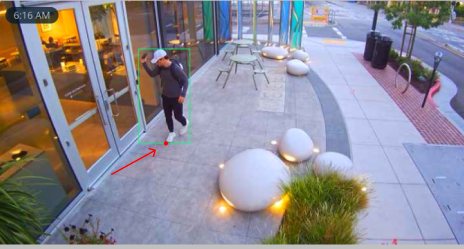
Detection is determined when the center bottom of a person’s bounding box crosses a line or sits inside a loitering region (in the majority of cases, it is a person’s feet).
Trigger Point
{% hint style="warning" %}
Use line crossing and loitering detection instead of person detection when available. Loitering detection and line crossing are only available on the CF81 and third-generation or newer cameras (models that end in "2" or higher), except the CP52.
{% endhint %}
## Configure alarm triggers
{% stepper %}
{% step %}
**In Verkada Command, go to All Products > Alarms.**
{% endstep %}
{% step %}
**Select a site, at the top right, click Settings.**
{% endstep %}
{% step %}
**Under Settings, go to Alarm Triggers.**
{% endstep %}
{% step %}
**On Camera Events:**
a. Click **Select Cameras.**\
b. Select a camera to configure.\
c. Configure the trigger type(s) as needed.\
d. Click **Done.**
{% endstep %}
{% step %}
**A trigger badge appears on the camera to indicate which trigger type has been enabled.**
{% endstep %}
{% step %}
**(Optional) Repeat step 4 on other cameras as needed.**
{% endstep %}
{% step %}
**Click Done when finished.**
{% endstep %}
{% endstepper %}
## Alarm triggers
### Person detection
Person detection is determined whenever any part of a person’s bounding box intersects with the configured region of interest.
### Line Crossing (recommended)
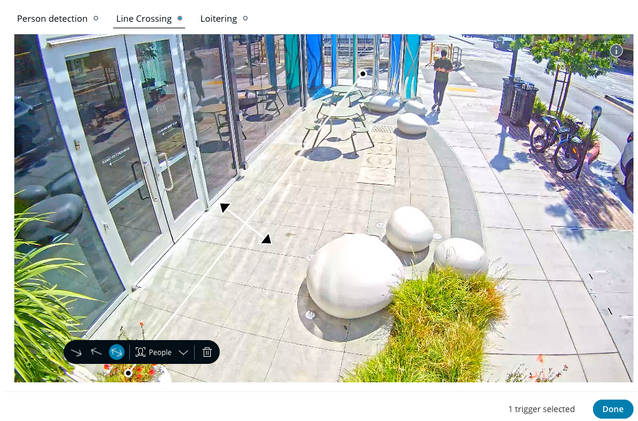
Line crossing provides more control and granularity in a trigger by allowing you to define a unidirectional or bidirectional line that a person has to cross before detection occurs.
You can define a maximum of 4 lines and choose the direction you expect people or vehicles to cross.
### Loitering detection
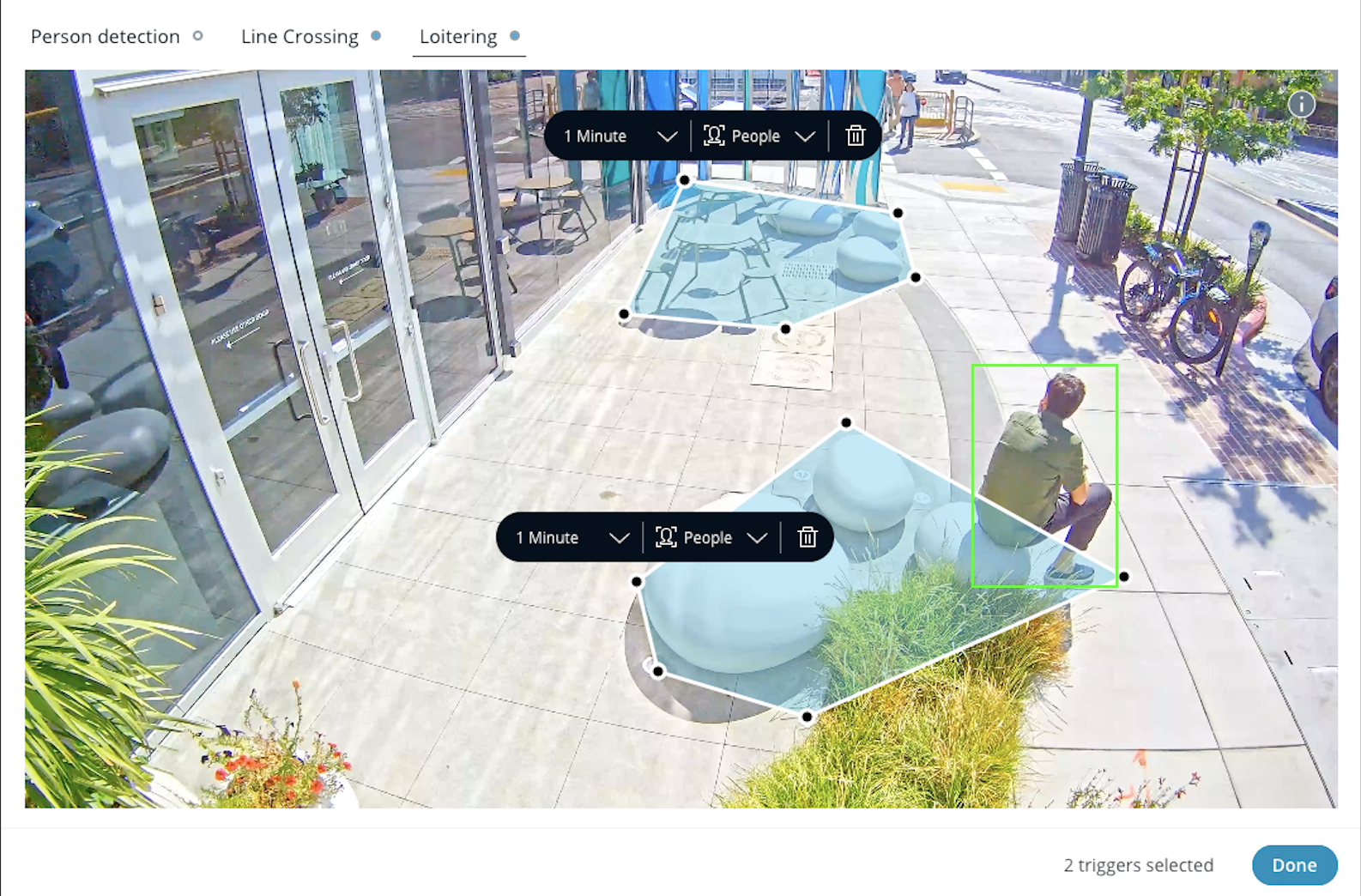
Loitering detection allows you to define a region with a freeform polygon and define how long a person has to stay in that region before detection occurs.
Define up to 4 freeform polygon regions and define how long a person has to stay in that region before detection occurs.
#### How it works
{% stepper %}
{% step %}
**Once the person’s trigger point intersects the loitering region, the timer begins.**
{% endstep %}
{% step %}
**If the trigger point remains in this region for the configured time (one minute default) a detection event occurs.**
{% endstep %}
{% step %}
**If the person’s trigger point briefly exits and re-enters the loitering region within 4 seconds, the counter continues.**
{% endstep %}
{% step %}
**If the camera loses track of an individual (for example, walking out of frame) or the trigger point is outside the loitering region for more than 4 seconds, the counter resets.**
{% endstep %}
{% endstepper %}
---
# Agent Instructions
This documentation is published with GitBook. GitBook is the documentation platform designed so that both humans and AI agents can read, navigate, and reason over technical content effectively. Learn more at gitbook.com.
## Querying This Documentation
If you need additional information that is not directly available in this page, you can query the documentation by asking a question.
Perform an HTTP GET request on the following URL with the `ask` and `goal` query parameters:
```
GET https://help.verkada.com/classic-alarms/events-and-alerts/configure-alarms-event-alerts/configure-camera-alarm-trigger-events.md?ask=&goal=
```
`ask` is the immediate question: it should be specific, self-contained, and written in natural language.
`goal` is what the user is ultimately trying to achieve, the reason they need the answer. Sharing it helps GitBook give you a better, more relevant answer. A goal is most helpful when it describes the outcome the user wants rather than restating the question. For example, with `ask=how do I create an API token`, a goal like `automate deployments from our CI pipeline` lets GitBook tailor the answer to that use case.
The response will contain a direct answer to the question and relevant excerpts and sources from the documentation.
Use this mechanism when the answer is not explicitly present in the current page, you need clarification or additional context, or you want to retrieve related documentation sections.