> For the complete documentation index, see [llms.txt](https://help.verkada.com/llms.txt). Markdown versions of documentation pages are available by appending `.md` to page URLs; this page is available as [Markdown](https://help.verkada.com/access-control/ja/she-ding/configure-a-door-with-a-motor-for-accessibility.md).
# アクセシビリティ向けにモーター付きドアを設定する
アクセシビリティを向上させるためにモーター付きドアを設定する方法を学ぶ
建物の外装に自動ドアオープナーを取り付けることは一般的であり、Americans with Disabilities Act (ADA) に準拠するためにも必要です。これにより、身体的にドアを引いて開けられない訪問者でも入室できるようにするためのボタン(または何らかの設備)を設けられます。
これらの種類のドアのアクセスコントロールは、ロック用ハードウェアのために難しくなります。たとえば、ドアがロックされているときにボタンでモーターが作動しないようにしたいはずです。
***
## モーターを直接配線する
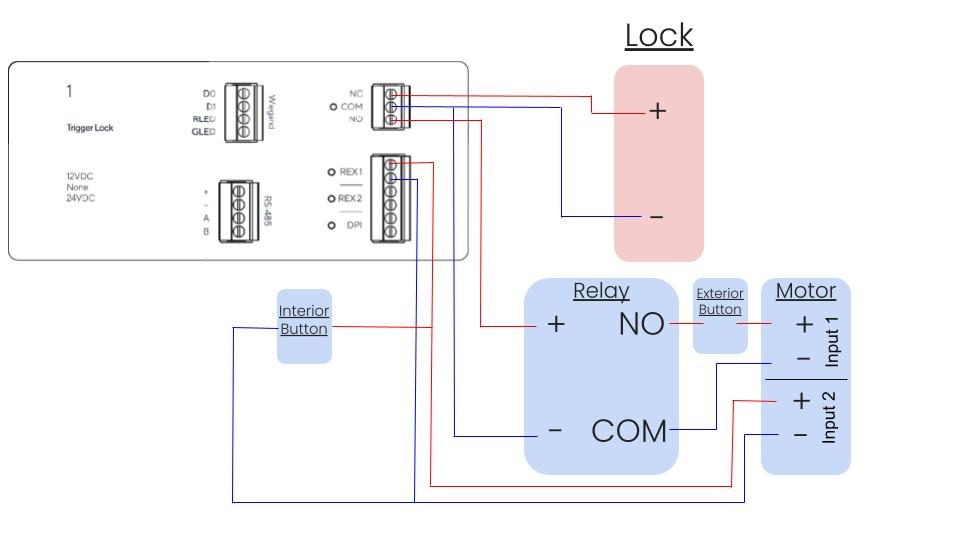
モーターに独立した入力が2つある場合は、次が必要です:
* 独立したボタン入力が2つあるモーター1台
* 制限付きの外部ボタン
* 制限なしの内部ボタン
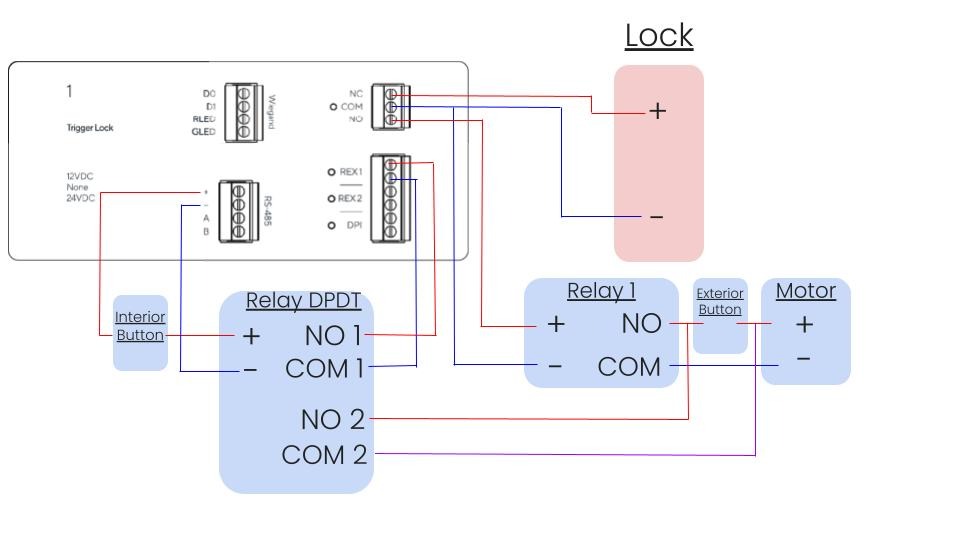
ネイティブな絶縁のない1つのドライドアを使用する標準的な設置では、次が必要です:
* 入力が1つあるモーター1台
* 制限付きの外部ボタン
* 制限なしの内部ボタン
* リレー1個
* DPDTリレー1個
{% hint style="info" %}
退出イベントでは、パッシブ赤外線(PIR)による退出要求(REX)とドア位置インジケーター(DPI)の使用を推奨します。
{% endhint %}
{% hint style="danger" %}
Verkadaは、第三者製機器によって生じた損害について責任を負いません。
{% endhint %}
***
## モーターハードウェアを理解する
より複雑なモーターの多くはこの問題に対応しており、アクセスコントロールシステムを接続するための追加入力が用意されています。
### モーターのモードを判定する
この入力 **必要とする** 1つの [12ボルトの高信号](#h_9d13cac7fb) または [閉ゲート/ボタン検出](#h_62a9ca50ed).
{% hint style="info" %}
どのモードか、このオプションが利用可能か、そしてどの電圧を想定しているかを確認するために、モーターのサービスマニュアルを確認することを強くお勧めします。
{% endhint %}
{% hint style="info" %}
どちらの場合も、内部ボタンをアクセスコントローラー上のREX解除入力に配線し、外部ボタンのトリガーとは分離された入力にする必要があります。
{% endhint %}
モーターが電圧高信号を想定している場合
**ロックをウェットで駆動する**
VerkadaアクセスコントローラーのドアポートのNOとCを、このモーターの入力に並列接続します。
**外部電源を使ってロックをドライで駆動する**
アクセス電源コントローラー(APC)の出力のNOとCを、このモーターの入力に並列に接続してドアロックへ接続します。APCのNOとCをボード上の追加のドア接続に接続し、利用可能であれば、Verkadaアクセスコントローラーからの単一入力でAPCが両方の出力をトリガーするように設定します(マルチドアモード)。
モーターが閉ゲート信号を想定している場合
このモードでは、2つの異なるボタンを同時に押す必要がある場合にのみ、モーターが作動する必要があります。
{% hint style="danger" %}
⚠️ このモードでモーターに電圧を送ると、機器に重大な損傷を与える可能性があります。
{% endhint %}
**ロックをウェットで駆動する**
外部リレーを使用して、VerkadaアクセスコントローラーのドアポートのNOとCを、この外部リレーの入力に並列接続します。そのリレーの出力では、NOとCをモーター入力の入力端子と共通端子に接続します。
**ロックをドライで駆動する**
ダブルポール・シングルスローでなければならない外部リレーを使用して、VerkadaアクセスコントローラーのドアポートのNOとCを、この外部リレーの入力に並列接続します。そのリレーの出力1では、NOとCをモーター入力の入力端子と共通端子に接続します。出力2では、Verkadaのドアポートに接続するのと同じようにAPCを接続します。
---
# Agent Instructions
This documentation is published with GitBook. GitBook is the documentation platform designed so that both humans and AI agents can read, navigate, and reason over technical content effectively. Learn more at gitbook.com.
## Querying This Documentation
If you need additional information that is not directly available in this page, you can query the documentation by asking a question.
Perform an HTTP GET request on the following URL with the `ask` and `goal` query parameters:
```
GET https://help.verkada.com/access-control/ja/she-ding/configure-a-door-with-a-motor-for-accessibility.md?ask=&goal=
```
`ask` is the immediate question: it should be specific, self-contained, and written in natural language.
`goal` is what the user is ultimately trying to achieve, the reason they need the answer. Sharing it helps GitBook give you a better, more relevant answer. A goal is most helpful when it describes the outcome the user wants rather than restating the question. For example, with `ask=how do I create an API token`, a goal like `automate deployments from our CI pipeline` lets GitBook tailor the answer to that use case.
The response will contain a direct answer to the question and relevant excerpts and sources from the documentation.
Use this mechanism when the answer is not explicitly present in the current page, you need clarification or additional context, or you want to retrieve related documentation sections.