> For the complete documentation index, see [llms.txt](https://help.verkada.com/llms.txt). Markdown versions of documentation pages are available by appending `.md` to page URLs; this page is available as [Markdown](https://help.verkada.com/access-control/ja/she-ding/bluetooth-unlock/bluetooth-unlock-with-geofencing.md).
# ジオフェンシングを使用した Bluetooth 解錠
Bluetooth 解錠でユーザーが遠隔でドアを解錠するのを防ぐ方法を学ぶ
Bluetooth Unlock は、モバイルアプリを [Verkada Pass](/access-control/ja/yzto/verkada-pass-app.md) 使ってドアのロックを解除できます。デフォルトでは、Remote Unlock 権限を持つユーザーは、どこからでもリモートでドアのロックを解除できます。オーガナイゼーション' のニーズに基づいてジオフェンスを作成によってモバイルでのロック解除を防ぐことができます。
{% hint style="danger" %}
Mobile Geofencing を有効にするには、Access Site Admin である必要があります。について詳しく学ぶ [アクセスコントロールのロールと権限](/access-control/ja/hajimeni/roles-and-permissions-for-access-control.md).
{% endhint %}
***
## ジオフェンスを作成を有効にする
{% stepper %}
{% step %}
**Verkada Command で、All Products > Access に移動します。**
{% endstep %}
{% step %}
**左側のパネルで、\[アクセス設定] をクリックします。**
{% endstep %}
{% step %}
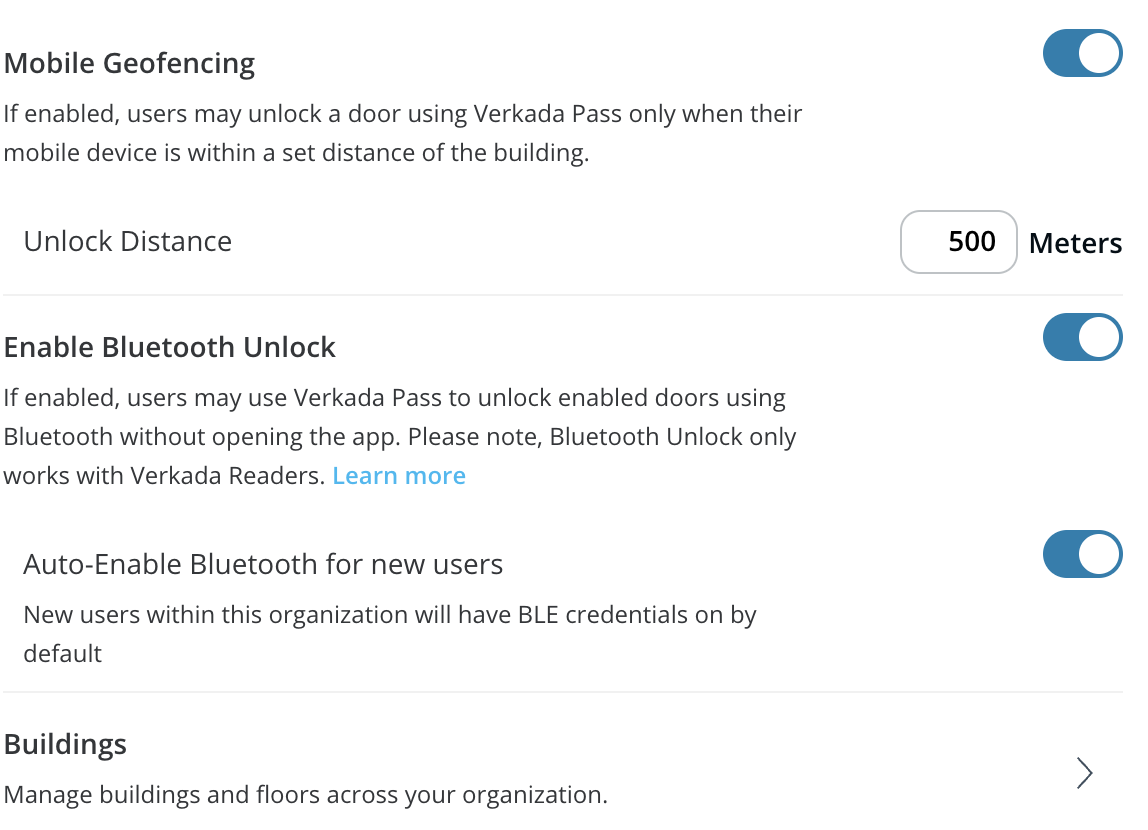
**モバイルのジオフェンスを作成をオンにします。**
{% endstep %}
{% step %}
**(オプション)デフォルトの解除距離は 1,640.42 ft (500m) に設定されています。ジオフェンスを作成の解除距離は 1 ~ 32,808.4 ft (10,000m) の間で設定できます。**
{% endstep %}
{% endstepper %}
{% hint style="warning" %}
ジオフェンスを作成の距離は、スマートフォンの GPS 位置の緯度と経度、およびアクセス コントローラーが割り当てられている建物の住所の緯度と経度に基づいており、 *スマートフォンからロックを解除するドアまでの距離ではありません。*
{% endhint %}
{% hint style="info" %}
最適なパフォーマンスのため、ジオフェンスを作成を 1,640.42 ft (500m) に設定することをお勧めします。
{% endhint %}
---
# Agent Instructions
This documentation is published with GitBook. GitBook is the documentation platform designed so that both humans and AI agents can read, navigate, and reason over technical content effectively. Learn more at gitbook.com.
## Querying This Documentation
If you need additional information that is not directly available in this page, you can query the documentation by asking a question.
Perform an HTTP GET request on the following URL with the `ask` and `goal` query parameters:
```
GET https://help.verkada.com/access-control/ja/she-ding/bluetooth-unlock/bluetooth-unlock-with-geofencing.md?ask=&goal=
```
`ask` is the immediate question: it should be specific, self-contained, and written in natural language.
`goal` is what the user is ultimately trying to achieve, the reason they need the answer. Sharing it helps GitBook give you a better, more relevant answer. A goal is most helpful when it describes the outcome the user wants rather than restating the question. For example, with `ask=how do I create an API token`, a goal like `automate deployments from our CI pipeline` lets GitBook tailor the answer to that use case.
The response will contain a direct answer to the question and relevant excerpts and sources from the documentation.
Use this mechanism when the answer is not explicitly present in the current page, you need clarification or additional context, or you want to retrieve related documentation sections.