> For the complete documentation index, see [llms.txt](https://help.verkada.com/llms.txt). Markdown versions of documentation pages are available by appending `.md` to page URLs; this page is available as [Markdown](https://help.verkada.com/access-control/ja/akusesu/door-schedules-and-exceptions.md).
# ドアのスケジュールと例外
ドアへのアクセスが許可されるスケジュールと例外を管理する
Express Modeを使用すると、 [Verkada アクセスコントロール](https://docs.verkada.com/docs/access-control-overview.pdf)、ドアの状態変更は2つの異なるコンポーネントを使用して自動化できます:
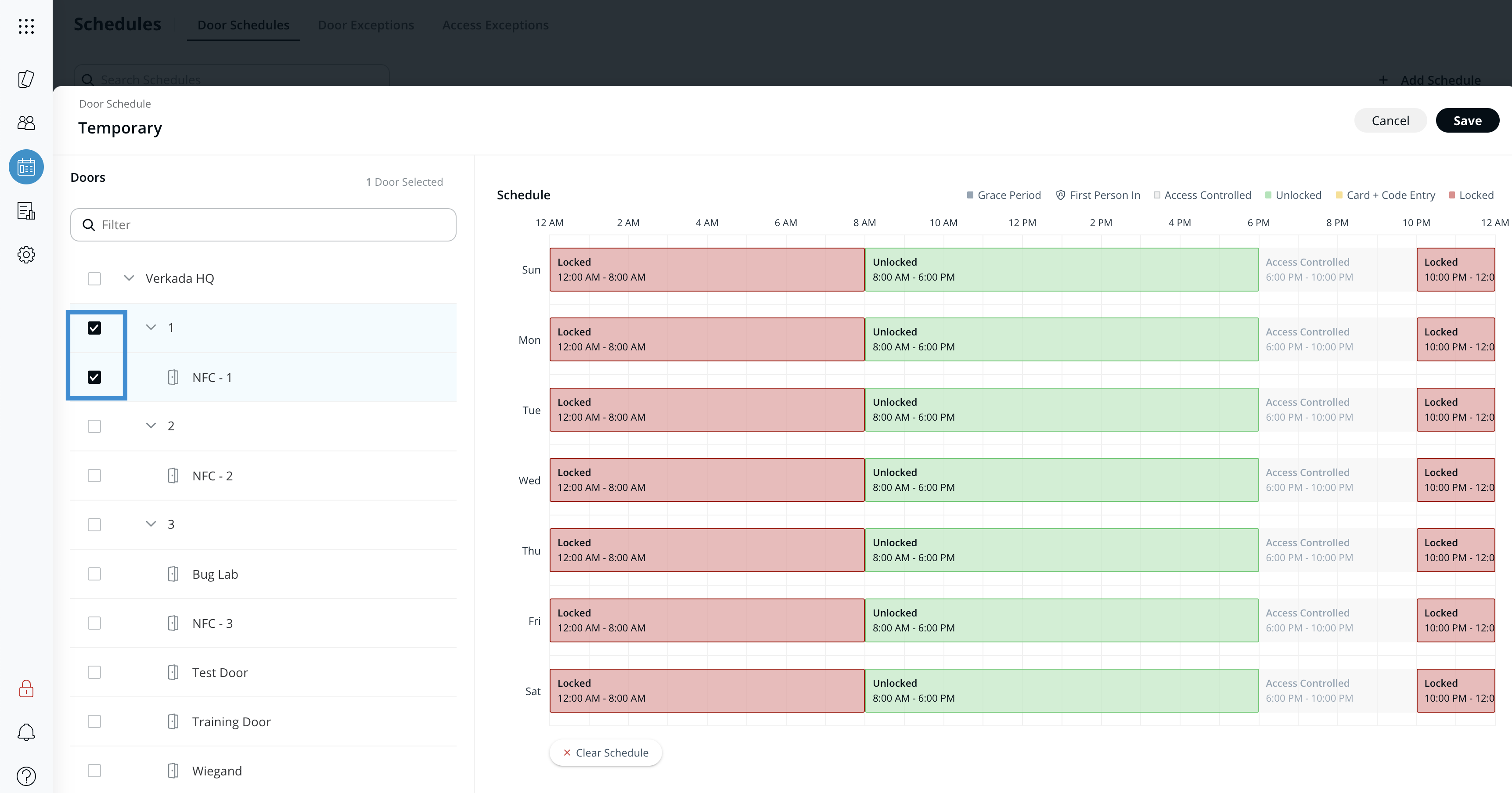
* **ドアスケジュール** 曜日ごとの通常のドア状態を定義します。
* **例外** 特定の日付と時間帯に応じて、ドアのスケジュールの一部を一時的に変更できます。例外は次を使用して管理します。 [ドア例外カレンダー](/access-control/ja/akusesu/door-schedules-and-exceptions/door-exception-calendars.md).
* 例外が役立つのは次のような場合です:
* 特定の日付に、一定期間(祝日など)だけドアの状態を一時的に変更する必要があるが、通常のスケジュールを変更する必要はない場合。
* ドアを、週単位ではない周期で状態が繰り返される通常のスケジュールに従わせる必要がある場合(例: 隔週、月1回など)。
* 例外はスケジュールより優先され、1日を通してドアの動作を変更します。通常、これは祝日や特別なイベントなど、一時的にアクセスを変更する必要がある場合に使用されます。
***
## ドアスケジュールを作成する
ドアにはユーザーアクセスを制御するためのスケジュールがあります。複数のドアで同じスケジュールを共有できます。複数のスケジュールを設定できますが、同時に有効にできるのは1つだけです。
{% stepper %}
{% step %}
**Verkada Command で、All Products > Access に移動します。**
{% endstep %}
{% step %}
**左側のパネルで、\[スケジュール] をクリックします。**
{% endstep %}
{% step %}
**[ドアスケジュール]を選択します。**
{% endstep %}
{% step %}
**右上で、[スケジュールを追加]をクリックします。**
a. スケジュールに一意の名前を付けます。\
b. スケジュールを作成します。\
c. ドアを追加します。\
d. (任意)オンにします [**最初の入室者**](/access-control/ja/akusesu/door-schedules-and-exceptions/first-person-in-feature.md).
{% endstep %}
{% step %}
**すべての変更が完了したら、\[Save] をクリックします。**
{% endstep %}
{% endstepper %}
***
## ドアスケジュールを変更する
{% hint style="warning" %}
オンにすると **最初の入室者**、他のユーザーにアクセスを許可する前に、認可されたユーザーが有効な認証情報を提示する必要があります。管理者は入室スケジュールを設定して、指定したドアを施錠して安全に保ち、監視対象グループの認可メンバーが予定された時間内に到着して認証情報を提示するまで解錠しないようにできます。
{% endhint %}
{% stepper %}
{% step %}
**Verkada Command で、All Products > Access に移動します。**
{% endstep %}
{% step %}
**左側のパネルで、\[スケジュール] をクリックします。**
{% endstep %}
{% step %}
**[ドアスケジュール]を選択します。**
{% endstep %}
{% step %}
**編集したいスケジュールを選択します。**
{% endstep %}
{% step %}
**必要に応じて、これらの設定を編集できます:**
a. スケジュール名を編集します。\
b. スケジュールを編集します。\
c. ドアを編集します。\
d. (任意)オン/オフを切り替えます [**最初の入室者**](/access-control/ja/akusesu/door-schedules-and-exceptions/first-person-in-feature.md).
{% endstep %}
{% step %}
**すべての変更が完了したら、\[Save] をクリックします。**
{% endstep %}
{% endstepper %}
{% hint style="warning" %}
ドア例外は、ドア例外カレンダーを使用してドアに適用されます。参照 [ドア例外カレンダー](/access-control/ja/akusesu/door-schedules-and-exceptions/door-exception-calendars.md) 詳細については
{% endhint %}
***
{% hint style="info" %}
**実際の動作をご覧になりますか?** こちらをご覧ください。 [動画チュートリアル](https://www.youtube.com/watch?v=jsqtoW21ZT4).
{% endhint %}
---
# Agent Instructions
This documentation is published with GitBook. GitBook is the documentation platform designed so that both humans and AI agents can read, navigate, and reason over technical content effectively. Learn more at gitbook.com.
## Querying This Documentation
If you need additional information that is not directly available in this page, you can query the documentation by asking a question.
Perform an HTTP GET request on the following URL with the `ask` and `goal` query parameters:
```
GET https://help.verkada.com/access-control/ja/akusesu/door-schedules-and-exceptions.md?ask=&goal=
```
`ask` is the immediate question: it should be specific, self-contained, and written in natural language.
`goal` is what the user is ultimately trying to achieve, the reason they need the answer. Sharing it helps GitBook give you a better, more relevant answer. A goal is most helpful when it describes the outcome the user wants rather than restating the question. For example, with `ask=how do I create an API token`, a goal like `automate deployments from our CI pipeline` lets GitBook tailor the answer to that use case.
The response will contain a direct answer to the question and relevant excerpts and sources from the documentation.
Use this mechanism when the answer is not explicitly present in the current page, you need clarification or additional context, or you want to retrieve related documentation sections.