> For the complete documentation index, see [llms.txt](https://help.verkada.com/llms.txt). Markdown versions of documentation pages are available by appending `.md` to page URLs; this page is available as [Markdown](https://help.verkada.com/access-control/installation/wiring-best-practices-for-third-party-wireless-locks/use-the-wireless-lock-internal-push-button.md).
# Use the Wireless Lock Internal Push Button
Learn how to manage access schedules with the push of a button
Verkada’s solution to how you manage access schedules and protect doors offers a variety of modes, described in this article.
## Standard modes
* **Access Controlled**—Access cards deliver an ephemeral change of state.
* **Unlocked**—Access cards are irrelevant; door is unlocked.
* **Locked**—Access cards are irrelevant; door is locked.
* **Lockdown** (Schedule)—Cards that can deliver an ephemeral change (people allowed to "unlock).
***
## Wireless lock integration modes
A few of the wireless lock models that Verkada supports come with an internal push button (located on the interior section of the lock, usually behind the reader). When you see this button, the following modes are supported on Schlage locks today.
In addition to the modes listed above, our wireless lock integrations support [Office](#h_448fd70f5d), [Classroom/Storeroom](#h_fdd275b228), and [Privacy](#h_2f3845da69) modes, as described below:
### Office mode
**Office (Function 50)**—The lockset is normally secure. The inside lever always allows free egress. You can use the interior push button on the inside housing to select a passage or secured status. This meets the need for a lockdown function for safety and security.
{% hint style="success" %}
**Use cases**
* User unlocks the door in the morning by pressing IPB → The door is unlocked for the rest of the day, until it is toggled again.
* User locks the door in the afternoon by pressing IPB → The door is relocked (access-controlled), until it is toggled again.
{% endhint %}
### Classroom/Storeroom mode
**Classroom/Storeroom (Function 70)**—Default mode. The lockset is normally secure. The inside lever always allows free egress.
### Privacy mode
Privacy mode is supported on:
* Schlage AD-series locks
* Schlage Engage NDEB/LEB/LE locks when in real-time (online) mode
* Assa Abloy locks
* Privacy mode is the only mode that Assa Abloy locks support
**Privacy Mode (Verkada Implementation)** —The lockset is normally secure. The inside lever always allows free egress. You can use the interior push button on the inside housing to select a privacy status. The button press is only registered when the door is closed and locked. The interior push button disables normal electronic access from the exterior. Opening the door deactivates the privacy status.
{% hint style="success" %}
**Use cases**
* User badges into a bathroom and toggles IPB → The door is no longer accessible for access users.
* User exits the bathroom → The door opening resets the door and is now accessible for all access users.
{% endhint %}
***
## Set up wireless lock
{% hint style="danger" %}
If your access controller is already added, you must [delete](/access-control/configuration/decommission-an-access-controller.md) and re-add it in **Schlage** **mode** or **Assa Abloy mode**.
{% endhint %}
{% stepper %}
{% step %}
**During the initial setup of your access controller, add your** [**AC12**](https://docs.verkada.com/docs/ac12-one-door-controller-datasheet.pdf)**,** [**AC41**](https://docs.verkada.com/docs/door-controller-ac41-datasheet.pdf)**, or** [**AC42**](https://docs.verkada.com/docs/door-controller-ac42-datasheet.pdf) **in Schlage or Assa Abloy mode. Learn how to set up** [**Schlage control wireless locks**](/access-control/installation/wiring-best-practices-for-third-party-wireless-locks/set-up-schlage-control-wireless-locks.md) **or** [**Assa Abloy Aperio wireless locks**](/access-control/installation/wiring-best-practices-for-third-party-wireless-locks/set-up-assa-abloy-aperio-wireless-locks.md)**. **
{% endstep %}
{% step %}
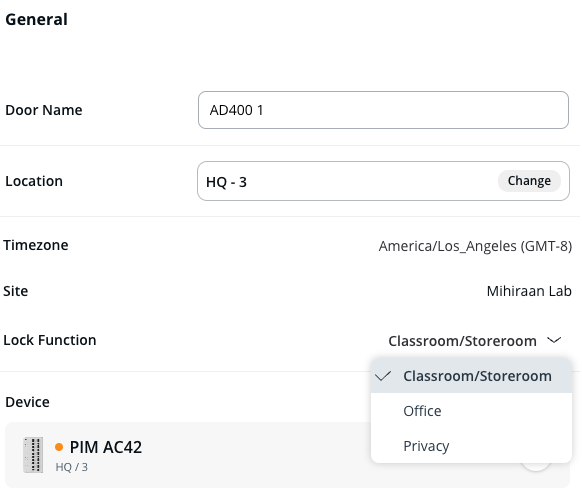
**On Add Door, specify the lock function:**
a. Next to **Lock Function**, click the **Office** dropdown and select **Classroom/Storeroom**, **Office**, or **Privacy** mode.\
b. Click **Next**.
{% endstep %}
{% step %}
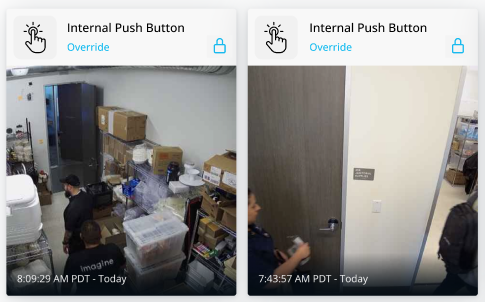
**When the internal push button is enabled, a door event appears in the door history page.**
Schedule changes do not take effect.
{% endstep %}
{% step %}
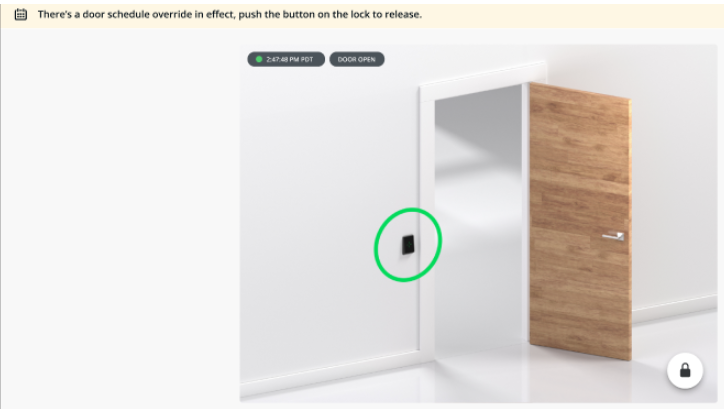
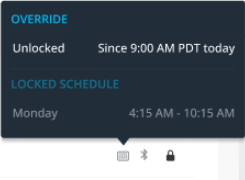
**You can view the override state on the door’s page.**
{% endstep %}
{% endstepper %}
{% hint style="danger" %}
If the lock runs out of battery or loses connection to the wireless hub, it can no longer be reached. As a result, lockdowns, overrides, and remote unlocks are not operational. In the event of an emergency or loss of connection, ensure that the locks remain access-controlled via the System Usability Scale (SUS) app:
* Comm loss fail mode: secure lock
* Configure battery fail mode: secure lock
{% endhint %}
***
## FAQ
What happens if I have the door in ‘Office Mode’ and forget to toggle it back to access controlled to secure the door?
An [Access Site Admin](/access-control/getting-started/roles-and-permissions-for-access-control.md) can remove an unlock override on a door. If it’s not manually cleared with a second IPB push or in Command, the override will automatically end when the schedule changes to a new time window or at midnight.
---
# Agent Instructions
This documentation is published with GitBook. GitBook is the documentation platform designed so that both humans and AI agents can read, navigate, and reason over technical content effectively. Learn more at gitbook.com.
## Querying This Documentation
If you need additional information that is not directly available in this page, you can query the documentation by asking a question.
Perform an HTTP GET request on the following URL with the `ask` and `goal` query parameters:
```
GET https://help.verkada.com/access-control/installation/wiring-best-practices-for-third-party-wireless-locks/use-the-wireless-lock-internal-push-button.md?ask=&goal=
```
`ask` is the immediate question: it should be specific, self-contained, and written in natural language.
`goal` is what the user is ultimately trying to achieve, the reason they need the answer. Sharing it helps GitBook give you a better, more relevant answer. A goal is most helpful when it describes the outcome the user wants rather than restating the question. For example, with `ask=how do I create an API token`, a goal like `automate deployments from our CI pipeline` lets GitBook tailor the answer to that use case.
The response will contain a direct answer to the question and relevant excerpts and sources from the documentation.
Use this mechanism when the answer is not explicitly present in the current page, you need clarification or additional context, or you want to retrieve related documentation sections.