> For the complete documentation index, see [llms.txt](https://help.verkada.com/llms.txt). Markdown versions of documentation pages are available by appending `.md` to page URLs; this page is available as [Markdown](https://help.verkada.com/access-control/installation/access-control-deployment-best-practices/integrate-external-power-with-the-ac41-in-emea.md).
# Integrate External Power with the AC41 in EMEA
Learn how to use external devices to power maglocks and crash bars in EMEA
The Verkada [AC41 access controller](https://docs.verkada.com/docs/door-controller-ac41-datasheet.pdf) can provide power to specific locks, as long as their inrush current does not exceed 350mA at 24V or 700mA at 12V.
{% hint style="warning" %}
The inrush current used to initially magnetize the lock can exceed the operating current and is sometimes not listed in the data sheets. If the requirements exceed the power that the AC41 can provide, the door is unable to lock and the AC41 could become damaged.
{% endhint %}
{% hint style="danger" %}
**Required:**
* Use an external access power controller (APC) dry setup when you wire a crash bar.
* Use an external APC dry setup when you wire up an electromagnetic lock(maglock).
* Ensure that power is disconnected from the AC41 and lock hardware **before** wiring readers and other devices. Failure to do so can damage the AC41.
{% endhint %}
## How the integration works
### Use an APC
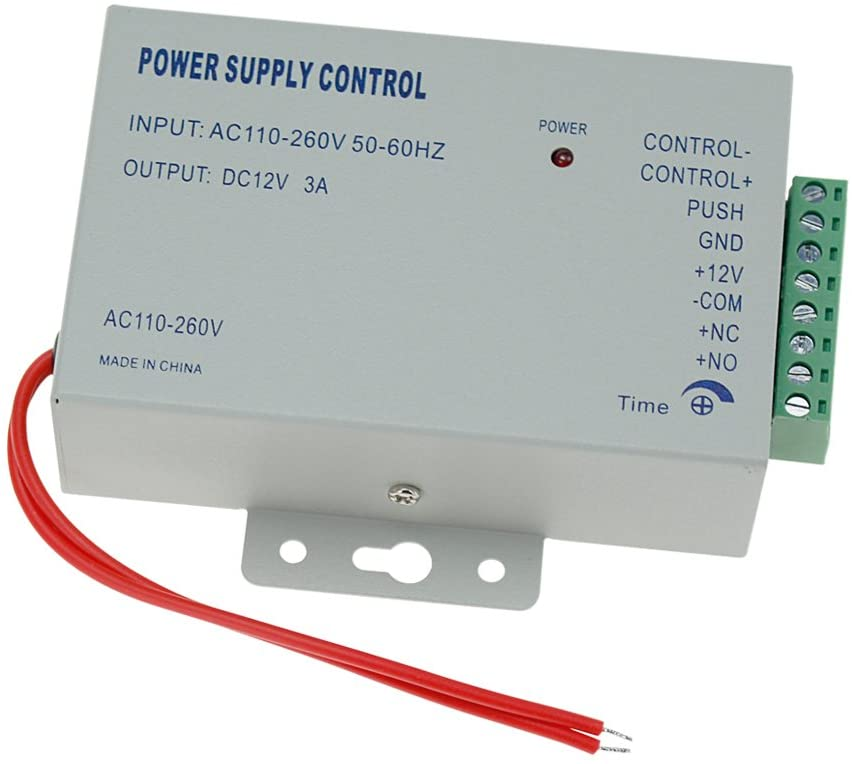
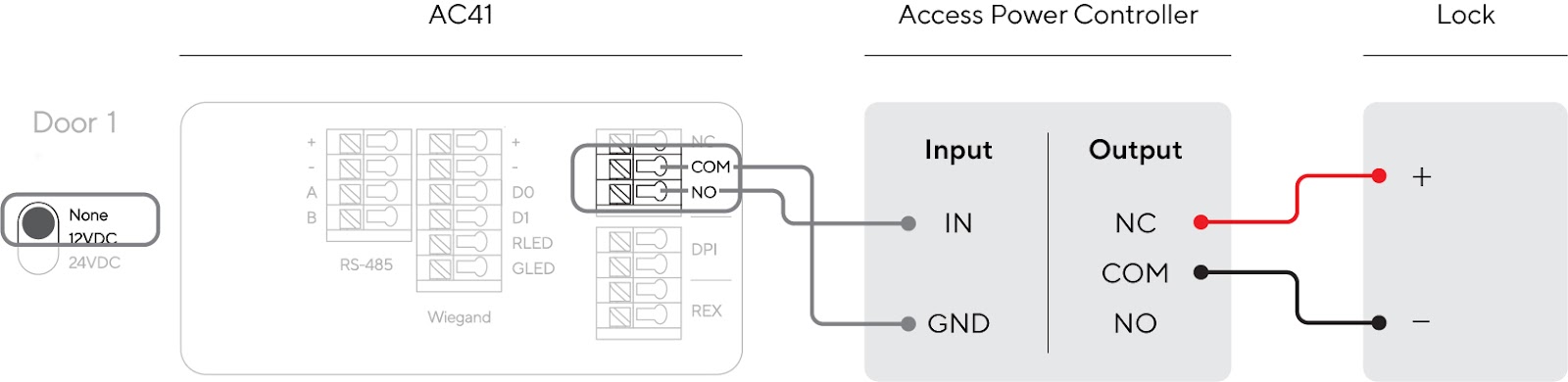
This option uses an external APC, such as the Altronix AL600ULACM (widely available in the US) or the Hfeng Access Control Power Supply Control Switch (available in EMEA, as shown below).
The AC41 runs **dry** (the toggle on the left side of the cassette is configured to **None**), and connects the NO and COM ports to IN and GND, respectively. (The IN port is sometimes labeled as **PUSH**, as shown above). The APC then uses its NC and COM ports to connect to the maglock.
### Create a manual release in case of an emergency
Because maglocks are constantly powered, fault tolerance needs to be built into the system. This process permits an exit in case of any emergency, without relying solely on the system.
{% stepper %}
{% step %}
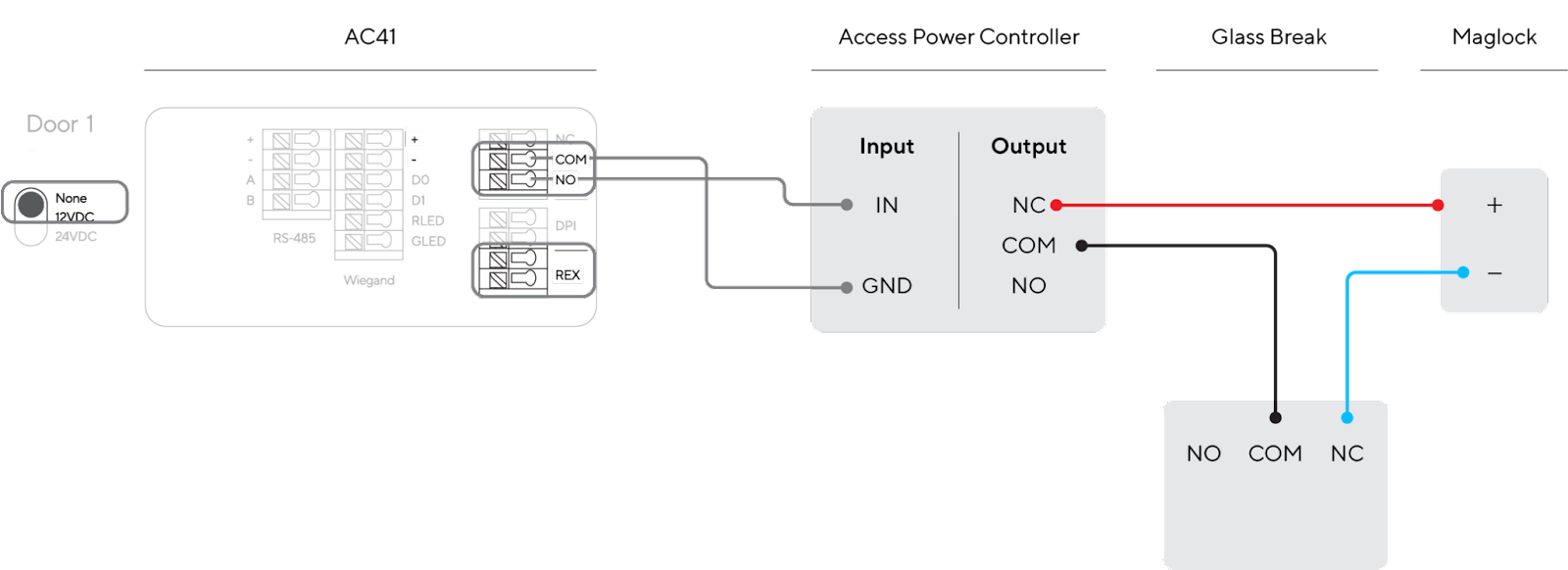
**Install a Glass Break button, in the vicinity of the request to exit (REX), that you can smash in case of an emergency; effectively breaking the circuit and allowing for an exit.**
{% hint style="danger" %}
You need to install this button in series with the APC and maglock.
{% endhint %}
{% endstep %}
{% step %}
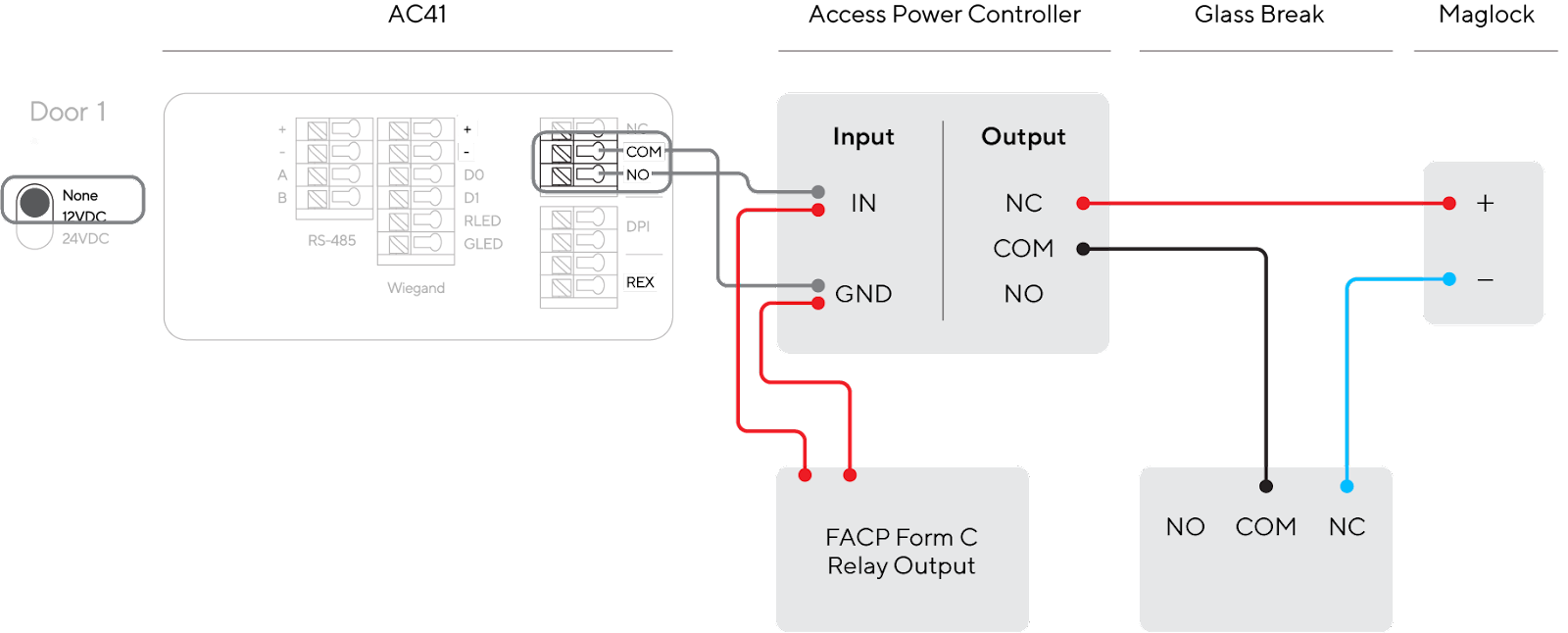
**Depending on local regulations, you might need to set up the fire alarm system to automatically drop power to the maglocks. To do this, wire the Fire Alarm Control Panel (FACP) Trigger Input in parallel with the AC41’s connections to the APC.**
{% endstep %}
{% step %}
**In the event of the FACP detecting a fire, you can configure it to set off the auxiliary relay (or series of relays) and instruct the APC to drop power.**
{% endstep %}
{% endstepper %}
{% hint style="warning" %}
The Verkada AC41 does not have a dedicated FACP input. This needs to be wired into the APC. The location of the FACP Trigger Input might vary depending on the APC used. It is the responsibility of the installer to read the appropriate documentation and understand the proper wiring configuration.
{% endhint %}
### Use a regular power supply
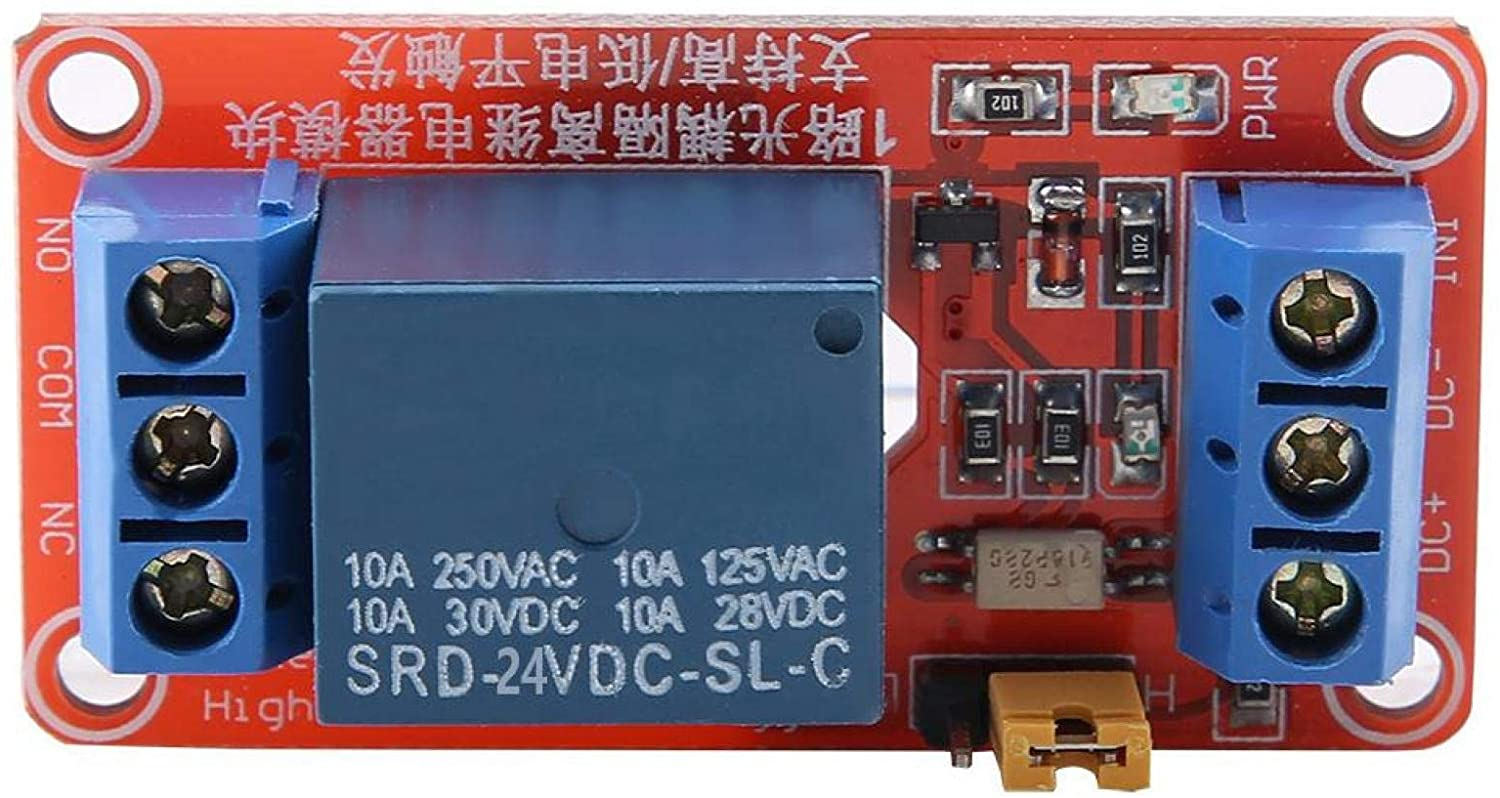
In case APC is not available, you can use a regular power supply unit (PSU), such as the Fortessa DC Boxed Switch Mode PSU, and an additional 12V/24V relay module (as shown below).
The required wiring is shown below (note the **Glass Break** required for manual egress in case of emergency, if the system is not responsive):

## AC42 and AC62 Considerations
Most of the recommendations listed in this article also apply to the second-generation controllers. However, the new [AC42](https://docs.verkada.com/docs/door-controller-ac42-datasheet.pdf) and [AC62](https://docs.verkada.com/docs/door-controller-ac62-datasheet.pdf) controllers come with terminal blocks (as opposed to cassettes), resulting in a much higher resistive load (2A at 24V or 4A at 12V). This means that you can use a regular PSU to power a lock up to 2A (at 24V), with an APC only needed over that limit. This is because it has a separate power relay that does not touch (thus damage) the access controller.
With this in mind, here are the 3 ways to power a lock using AC42 or AC62:
| | |
| -------------------------------- | ------------------------------------------------------------------------------------------------------------------------------------------------------------------------- |
| **Lock Criteria** | **Power Lock Method** |
| Locks under 350mA @ 24V | The controller powers them **wet**. No third-party device is required. |
| Locks between 350mA and 2A @ 24V | Use a regular PSU in series with the lock and AC unit (Glass Break recommended for NC circuits; see diagram below), or just a regular APC (as per the previous diagrams). |
| Locks over 2A @ 24V | Use an APC (just as you would for an AC41 running a lock **dry**). |
---
# Agent Instructions
This documentation is published with GitBook. GitBook is the documentation platform designed so that both humans and AI agents can read, navigate, and reason over technical content effectively. Learn more at gitbook.com.
## Querying This Documentation
If you need additional information that is not directly available in this page, you can query the documentation by asking a question.
Perform an HTTP GET request on the following URL with the `ask` and `goal` query parameters:
```
GET https://help.verkada.com/access-control/installation/access-control-deployment-best-practices/integrate-external-power-with-the-ac41-in-emea.md?ask=&goal=
```
`ask` is the immediate question: it should be specific, self-contained, and written in natural language.
`goal` is what the user is ultimately trying to achieve, the reason they need the answer. Sharing it helps GitBook give you a better, more relevant answer. A goal is most helpful when it describes the outcome the user wants rather than restating the question. For example, with `ask=how do I create an API token`, a goal like `automate deployments from our CI pipeline` lets GitBook tailor the answer to that use case.
The response will contain a direct answer to the question and relevant excerpts and sources from the documentation.
Use this mechanism when the answer is not explicitly present in the current page, you need clarification or additional context, or you want to retrieve related documentation sections.